How Vector Databases Work Internally
The complete guide to vector database internals — from brute-force search to HNSW graph construction, approximate vs exact search tradeoffs, quantization techniques, and why Pinecone, Weaviate, and Qdrant make different architectural choices. Interactive graph visualizations and production pattern guides.
Why Vector Search Exists — And Why Traditional Databases Can't Do It
Here's a question that sounds simple but breaks every traditional database: “Find me documents similarto this one.” Not documents with the same keywords — documents with the same meaning. A user searching for “how to fix a slow Python script” should find articles about “Python performance optimization” even though those words don't overlap. PostgreSQL can't do this. MongoDB can't do this. Elasticsearch gets partway there with BM25, but it's still matching tokens, not understanding concepts.
The breakthrough was embedding models — neural networks that convert text (or images, or audio) into dense vectors of 768 to 3072 floating-point numbers. These vectors live in a high-dimensional space where distance equals meaning. Documents about similar topics cluster together. The question “find similar documents” becomes “find the nearest vectors” — a purely mathematical operation. This is what powers every RAG pipeline, every semantic search engine, and every AI-powered recommendation system you use.
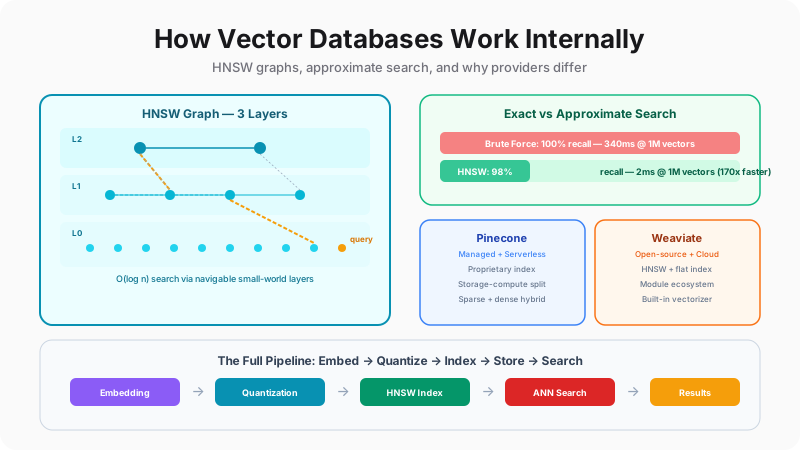
But here's the catch: finding the nearest vectors among millions is computationally brutal. A brute-force scan of 1 million 1536-dimensional vectors requires 3 billion floating-point operations— per query. At 100 queries per second, that's 300 billion operations per second, just for search. This is where vector databases earn their keep. They use clever data structures — most importantly HNSW (Hierarchical Navigable Small World) graphs — to find approximate nearest neighbors in 2 milliseconds instead of 340, visiting only 0.08% of the data. Let's see the difference.
Search Race: Brute-Force vs HNSW
1 million 1536-dim vectors. Same query. Watch the difference.
Distance Metrics — How “Similar” is Defined
The metric you choose fundamentally changes what “nearest neighbor” means.
cos(θ) = (A·B) / (‖A‖·‖B‖)Intuition
Measures the angle between two vectors, ignoring magnitude. Two documents about "machine learning" will have high cosine similarity even if one is much longer than the other.
Best for
Text embeddings, semantic search, RAG
Range
-1 to 1 (usually 0 to 1 for embeddings)
Rule of thumb: Use cosine for text/embeddings (OpenAI, Cohere, Voyage models all emit normalized vectors). Use euclidean for spatial/image features. Use dot product only when vectors are pre-normalized or when magnitude carries meaning.
Scale Impact Calculator
See how vector count, dimensionality, and precision affect memory and search latency.
5.7 GB
Raw vectors
13.7 GB
With HNSW index
307ms
Brute force latency
3.0ms
HNSW latency
The 170x speedup comes from a fundamental algorithmic insight: you don't need to check every vector if you have a smart data structure that lets you “navigate” toward the answer. The dominant structure in production is HNSW — a multi-layered graph that acts like a highway system for vectors. Let's build one from scratch and watch it work.
HNSW — The Graph That Powers Every Vector Database
HNSW stands for Hierarchical Navigable Small World— a name that sounds academic but describes exactly what it does. Think of it like Google Maps routing. You don't drive from New York to San Francisco by checking every street in America. You first take a highway (sparse, long-distance connections), then exit onto a regional road (medium connections), then navigate local streets (dense, short-distance connections). HNSW does the same thing with vectors.
The graph has multiple layers. The top layeris extremely sparse — just a few “entry point” nodes with long-range connections. The middle layershave progressively more nodes and shorter connections. The bottom layercontains every single vector, each connected to its nearest neighbors. When you search, you start at the top and greedily hop toward your query vector, dropping down a layer whenever you can't get any closer. By the time you reach the bottom layer, you're already in the right neighborhood.
The math is elegant: each layer is assigned to a node with probability 1/ln(M), where M is the maximum number of connections. This exponential decay means Layer 0 has all N nodes, Layer 1 has ~N/M, Layer 2 has ~N/M², and so on. Search complexity ends up as O(log N)— comparable to a balanced tree, but with the advantage of working in high-dimensional continuous space. Let's watch a search happen step by step.
HNSW Search — Live Graph Traversal
Watch the greedy search navigate layers from top to bottom, visiting only a handful of nodes to find the nearest neighbor.
HNSW Tuning Parameters
Three knobs control the entire recall/speed/memory tradeoff. Understanding them is essential.
Maximum number of edges per node. Higher M = more connections = better recall but more memory.
Low setting
M = 4
Fast construction, low memory, lower recall (~90%)
High setting
M = 64
Slow construction, high memory, excellent recall (~99.5%)
Recommendation: M = 16 for most workloads. M = 32-48 for high-recall requirements.
Now you understand the search algorithm, but there's a complete pipeline that runs before search is even possible. Your raw text needs to become a vector, that vector might need to be compressed, and it needs to be inserted into the HNSW graph with the right connections. Every call to collection.add()triggers a multi-stage pipeline. Let's trace through it.
The Indexing Pipeline — From Text to Searchable Vector
When you call collection.upsert() in Pinecone or client.data.insert()in Weaviate, a remarkable amount of machinery runs behind the scenes. Your raw text is transformed into a dense vector by an embedding model, potentially compressed through quantization to save memory, inserted into the HNSW graph with neighbor connections, and finally persisted to durable storage with crash-consistency guarantees. Each stage has its own performance characteristics, failure modes, and tuning knobs.
The most impactful decision in this pipeline is quantization— how aggressively you compress vectors to save memory. A 1536-dimensional vector in FP32 takes 6,144 bytes. At 10 million vectors, that's 57 GB just for raw vectors — before the HNSW index overhead. Scalar quantization (INT8) cuts this to 14 GB. Product quantization cuts it to 1.8 GB. Binary quantization cuts it to 450 MB. Each compression level trades a small amount of recall accuracy for dramatic memory savings. Choosing the right point on this tradeoff curve is one of the most important engineering decisions when deploying a vector database.
The Indexing Pipeline — Step by Step
From raw text to searchable vector — every stage that happens when you call collection.add().
Quantization Techniques Compared
How to fit 10M vectors (1536-dim) into memory — the compression vs recall tradeoff.
Full 32-bit precision. Best recall, highest memory cost. Baseline for comparison.
Maps each float to an 8-bit integer. 4x compression with minimal recall loss. The default production choice for most workloads.
Splits vector into subvectors, encodes each with a trained codebook. 32x compression. Used when memory is extremely constrained.
Each dimension becomes 1 bit (positive or negative). 128x compression. Very fast distance computation via POPCNT. Best for re-ranking pipelines.
Production pattern: Use scalar (INT8) quantization for the in-memory search index, then re-rank the top-K results against full FP32 vectors loaded from disk. This gives you the speed of quantized search with the precision of full-resolution re-ranking.
With the internal machinery understood, a natural question emerges: if all vector databases use HNSW and similar quantization techniques, why do Pinecone, Weaviate, and Qdrant exist as separate products? The answer is that the algorithm is just one layer — the architectural decisions around storage, scaling, filtering, and developer experience create fundamentally different products. Let's compare them.
Pinecone vs Weaviate vs Qdrant — Three Philosophies
Choosing a vector database is like choosing between AWS Lambda, a Kubernetes cluster, and bare metal servers — the underlying compute is similar, but the abstractions, tradeoffs, and operational models are radically different. Pinecone is the fully-managed, serverless-first option that abstracts away all infrastructure. Weaviate is the open-source, module-rich platform that integrates vectorization directly. Qdrantis the Rust-based, performance-obsessed engine optimized for maximum throughput and flexibility.
These aren't just marketing differences. Pinecone uses a proprietary index (not vanilla HNSW) with storage-compute separation — your data lives on cheap storage and compute scales independently. Weaviate uses standard HNSW with memory-mapped files and a unique module ecosystem that lets you plug in vectorizers, rankers, and generators directly. Qdrant uses HNSW with a segment-based architecture (inspired by Lucene) that allows concurrent reads and writes without global locks, plus on-disk index support for datasets larger than RAM.
The right choice depends on your specific constraints: team size, operational maturity, dataset scale, latency requirements, and budget. The interactive comparison below lets you explore each provider's architecture in depth and get a tailored recommendation.
Pinecone vs Weaviate vs Qdrant — Architectural Differences
Same goal, very different engineering choices. Click a provider to explore.
Feature Matrix
Quick reference for the key differences.
| Feature | Pinecone | Weaviate | Qdrant |
|---|---|---|---|
| Open Source | No | Yes (Go) | Yes (Rust) |
| Primary Index | Proprietary | HNSW | HNSW + on-disk |
| Hybrid Search | Native sparse-dense | BM25 + vector fusion | Sparse vectors |
| Binary Quantization | No | Yes | Yes |
| Built-in Vectorizer | Inference API | Module system | FastEmbed |
| Filter Strategy | Single-stage | Pre-filter + ANN | During HNSW traversal |
| On-disk Index | Serverless auto | Memory-mapped | Yes (configurable) |
| Multi-tenancy | Namespaces | Multi-tenant class | Payload groups |
| Free Tier | 100K vectors | $0 self-host | $0 self-host |
Best for
- • Teams wanting zero ops overhead
- • Serverless/pay-per-query workloads
- • Sparse-dense hybrid search
Best for
- • Teams wanting built-in vectorization
- • GraphQL-native applications
- • Module extensibility requirements
Best for
- • Maximum query performance
- • Datasets larger than available RAM
- • Complex filtering during search
Which Should You Pick?
Answer three questions and get a tailored recommendation.
Free tier handles 100K vectors. Zero config. Best for getting a RAG prototype running in hours.
Regardless of which provider you choose, deploying a vector database in production means dealing with a set of challenges that don't exist in development: filtered search across metadata, hybrid keyword+vector queries, horizontal scaling, and memory management at scale. These production patterns are provider-agnostic but their implementations differ. Let's cover the essential ones.
Production Patterns — Filtering, Hybrid Search, and Scaling
In development, vector search is simple: embed a query, find the top-K nearest vectors, done. In production, it's never that clean. Your users want to filter results by category, date range, or access permissions — while doing vector search. They want keyword precision combined with semantic recall. And as your dataset grows from 100K to 100M vectors, the single-node architecture that worked in development starts creaking.
Filtered search is the most common production requirement and the one that trips people up the most. The naive approach — run ANN search first, then filter — gives terrible results when the filter is selective (imagine finding the nearest vector among documents from a specific user — there might be only 50 out of 10 million). Each provider handles this differently, and the strategy matters enormously for performance.
Hybrid searchcombines keyword matching (BM25/sparse vectors) with semantic vector search in a single query. This is critical for RAG applications where users might search for “PostgreSQL VACUUM” (exact term) or “how to reclaim space in my database” (semantic meaning). Pure vector search misses the first; pure keyword search misses the second. Hybrid catches both. Let's see how each pattern works.
Filtered Vector Search — Three Strategies
“Find me similar documents, but only from the legal department, published after 2024.” How each provider handles this.
First applies the metadata filter to get a candidate set, then runs HNSW search only on those candidates. Best when filters are selective (few results pass).
Strengths
✓ Exact filter results
✓ No false negatives from filtering
Tradeoffs
✗ Slow for non-selective filters (>50% pass)
✗ Builds temporary candidate set
Hybrid Search — Keywords + Vectors
Pure vector search misses exact keyword matches. Pure keyword search misses semantic meaning. Hybrid combines both.
Keyword (BM25/Sparse)
0.85
Exact term matching. Catches “PostgreSQL” when the query says “PostgreSQL.”
Weight: 30%
Vector (Dense)
0.72
Semantic meaning. Catches “relational database” when the query says “PostgreSQL.”
Weight: 70%
Hybrid Score
0.759
Weighted combination captures both exact matches and semantic relevance.
α × vector + (1−α) × keyword
Best practice: Start with α = 0.7 (70% vector, 30% keyword) for RAG applications. Increase α for conceptual/exploratory queries. Decrease α for technical documentation where exact terms matter.
Production Scaling Patterns
How vector databases scale from thousands to billions of vectors.
Split vectors across multiple nodes. Each shard holds a subset with its own HNSW index. Query hits all shards in parallel, results are merged. Scales write throughput and total capacity linearly.
When to use
Dataset exceeds single-node memory. Need to scale writes.
Tradeoff
Added latency from scatter-gather. Cross-shard consistency complexity.
# Qdrant example — 3 shards, 2 replicas
client.create_collection(
    collection_name="products",
    shard_number=3,
    replication_factor=2,
    vectors_config=VectorParams(size=1536, distance=Distance.COSINE)
)
Architecture rule: Start with a single node. Add quantization first (cheapest optimization). Then tiered storage (move full vectors to disk). Then sharding (split across nodes). Then replication (scale reads). Each step should be driven by actual bottleneck data, not premature optimization.
The Complete Picture
Let's connect everything. At the mathematical level, vector databases solve the nearest neighbor problem in high-dimensional space — turning semantic similarity into geometric distance. At the algorithmic level, HNSW provides O(log N) approximate search by building a navigable multi-layer graph. At the systems level, quantization, filtered search, hybrid queries, and horizontal scaling turn the algorithm into a production-grade data infrastructure.
The providers — Pinecone, Weaviate, Qdrant, and others — are different answers to the same fundamental question: how do you make high-dimensional nearest neighbor search fast, reliable, and economical at scale? Pinecone answers with managed infrastructure and serverless economics. Weaviate answers with open-source modularity and built-in AI integration. Qdrant answers with Rust performance and storage flexibility. Understanding the internals — not just the APIs — lets you make the right architectural choice and tune your deployment for your specific workload. You now know what happens inside the black box.