Stripe Payment System Design
The complete architecture behind every online payment — from clicking "Pay" to money landing in your bank. Tokenization, PCI compliance, idempotency keys, webhook delivery, fraud detection, double-entry ledgers, and distributed system patterns at scale with interactive diagrams.
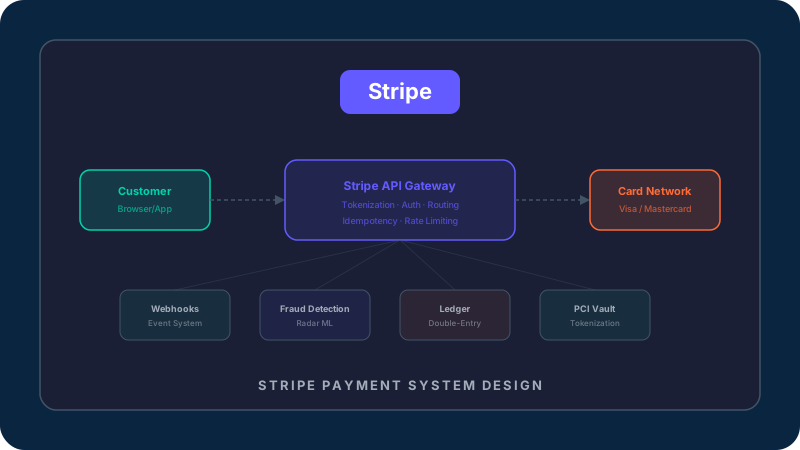
What Happens When You Click “Pay”
Every day, Stripe processes hundreds of millions of dollarsin transactions. Behind that simple “Pay” button lies one of the most sophisticated distributed systems ever built — touching cryptography, fraud detection, banking networks, regulatory compliance, and real-time event processing. Let's trace every millisecond of what happens when a customer pays $49.99 for your SaaS product.
Most tutorials skim over payments as “call the API, done.” But understanding the full pipeline — from card tokenization to settlement — makes you a fundamentally better engineer. You'll understand why idempotency keys exist, why webhooks are essential, why PCI compliance matters, and why that payment takes 2 days to actually land in your bank account.
The customer has been browsing your SaaS product, added a Pro plan to their cart, and just clicked the purple "Pay" button. This single click triggers one of the most sophisticated distributed systems on the internet. But here's the thing most developers don't realize — the card number never touches your server. Not even for a millisecond.
Under the Hood
Stripe.js (loaded from js.stripe.com) intercepts the form submission. The card number, expiry, and CVC are collected inside a Stripe-hosted iframe — an isolated browser context your JavaScript cannot access. This is the foundation of PCI compliance: your server never sees raw card data, which means you only need SAQ-A (the simplest PCI questionnaire) instead of the full SAQ-D audit that costs $50K+/year.
// Your frontend code — notice: no card numbers here
const stripe = Stripe('pk_live_...');
const { token, error } = await stripe.createToken(cardElement);
// token = "tok_1MqVnB2eZvKYlo..." (safe to send to your server)
// The actual card number? Already encrypted and stored in Stripe's PCI vault.That's the 30,000-foot view — from click to cash in 7 steps. But each of these steps hides enormous complexity. Let's zoom into the architecture that makes all of this work at Stripe's scale: processing thousands of transactions per second, across 195+ countries, with 99.999% uptime.
System Architecture — Inside Stripe's Infrastructure
Stripe isn't a single monolithic application — it's a constellation of specialized microservices, each responsible for one critical function. The API Gateway routes requests. The Payment Service orchestrates the flow. The PCI Vault guards card numbers behind HSMs. Radar catches fraudsters with ML. The Ledger tracks every cent. And the Webhook Engine ensures you never miss an event.
Click on any service in the architecture diagram below to understand what it does, how it's built, and why it matters. This is roughly how a $95B+ company processes payments for millions of businesses.
Click any service in the diagram to explore its architecture
Notice how each service has a single, clear responsibility. The Payment Service never touches raw card numbers — that's the PCI Vault's job. The Ledger never makes external calls — it only records what the Payment Service tells it. This separation of concerns is what allows Stripe to scale each component independently, deploy changes safely, and maintain PCI compliance. Now let's zoom into the most critical flow: how a payment actually moves through this system.
The PaymentIntent State Machine
At the heart of every Stripe payment is a PaymentIntent — a stateful object that tracks a payment from creation to completion. Think of it as a finite state machine with clearly defined transitions. This design is what makes Stripe reliable: every payment is always in exactly one known state, transitions are atomic, and the system can recover from failures by resuming from the last known state.
Understanding these states isn't just academic — it directly affects how you build your checkout. Should you fulfill the order when the API returns “succeeded”? Or wait for the webhook? What happens if the customer's bank requires 3D Secure? What if the payment is stuck in “processing” for days? Let's walk through each state.
The PaymentIntent has been created but no payment method is attached yet. The customer hasn't entered their card details. This is the initial state.
Why This State Matters
This state exists because Stripe separates intent creation from payment confirmation. Your server creates the PaymentIntent (reserving an idempotency slot), then your frontend collects the card. This two-step flow is what enables Stripe Elements, Apple Pay, Google Pay, and other payment methods — all without your server ever seeing card data.
// Create a PaymentIntent (server-side)
const pi = await stripe.paymentIntents.create({
  amount: 4999,
  currency: 'usd',
});
// pi.status === 'requires_payment_method'
// pi.client_secret === 'pi_3MqVnB..._secret_...' → send this to frontendThe PaymentIntent state machine is the foundation, but what makes Stripe truly reliable is how it handles the real world — network failures, duplicate requests, server crashes mid-transaction. That's where idempotencycomes in, and it's one of the most important distributed systems concepts you'll ever learn.
Idempotency — The Art of Exactly-Once Processing
Here's a scenario that keeps payment engineers up at night: your server sends a charge request to Stripe, Stripe charges the card, but the response is lost due to a network blip. Your server doesn't know if the charge went through. Do you retry? If you do, the customer gets charged twice. If you don't, you've lost revenue. This is the exactly-once delivery problem, and it's one of the hardest problems in distributed systems.
Stripe's solution is idempotency keys— a deceptively simple concept that eliminates double charges entirely. You send a unique key with every request. If Stripe sees the same key twice, it returns the original result instead of reprocessing. No double charges. No lost transactions. No data inconsistency. Let's see exactly how this works in every failure scenario.
❌ charge(card) // network error → customer charged, you don't know
Risk: Lost revenue or unfulfilled order
❌ retry(charge(card)) // customer charged TWICE
Risk: Double charge → chargeback → angry customer
✅ retry(charge(card, idempotencyKey)) // exactly once
Risk: Zero risk — Stripe deduplicates
What Happened
The straightforward case. Your server sends the request, Stripe processes it, returns the result, and you fulfill the order. The idempotency key ("order_123") is stored by Stripe for 24 hours — but in this happy path, it's never needed.
// PRODUCTION-GRADE idempotent payment flow:

async function chargeCustomer(orderId: string, amount: number) {
  // 1. Generate a deterministic idempotency key from your order ID
  //    NEVER use random UUIDs — you can't regenerate them on retry!
  const idempotencyKey = `charge_${orderId}_v1`;

  // 2. Record intent in YOUR database BEFORE calling Stripe
  await db.orders.update(orderId, { status: 'charging', stripe_key: idempotencyKey });

  try {
    // 3. Call Stripe with the idempotency key
    const pi = await stripe.paymentIntents.create({
      amount,
      currency: 'usd',
      confirm: true,
      payment_method: 'pm_card_visa',
      metadata: { order_id: orderId },
    }, {
      idempotencyKey,
      timeout: 30000,  // 30s timeout
    });

    // 4. Record success
    await db.orders.update(orderId, { status: 'paid', stripe_pi: pi.id });
    return pi;

  } catch (err) {
    if (err.type === 'StripeIdempotencyError') {
      // Key was used with different parameters — this is a bug in your code
      throw new Error('Idempotency conflict — check your key generation');
    }
    if (err.statusCode === 409) {
      // Concurrent request with same key — safe to retry after a delay
      await sleep(1000);
      return chargeCustomer(orderId, amount);  // Recursive retry
    }
    // Network error or 5xx — safe to retry with same idempotency key
    throw err;  // Let your retry queue handle it
  }
}

// 5. Background retry job (runs every 30s)
async function retryStuckOrders() {
  const stuck = await db.orders.find({ status: 'charging', updated_at: { $lt: '5 minutes ago' } });
  for (const order of stuck) {
    await chargeCustomer(order.id, order.amount);  // Safe because of idempotency key!
  }
}
Key Generation
Use deterministic keys derived from your order/request ID. Never use random UUIDs — you can't regenerate them on retry. Pattern: charge_{orderId}_v{version}
Key Scope
One key per Stripe API call, not per order. If an order involves creating a customer + creating a charge, use two different keys: customer_{orderId} and charge_{orderId}
Key Expiry
Stripe stores keys for 24 hours. After that, the same key is treated as new. For retries spanning multiple days, implement your own deduplication on top.
Parameter Mismatch
If you send the same key with different parameters (e.g., different amount), Stripe returns a 400 error. This is a safety feature — it means your code has a bug.
Idempotency is the first layer of Stripe's defense-in-depth approach. But protecting against double charges is just one piece of the puzzle. The next critical piece is security— how does Stripe ensure that card numbers are never exposed, that your integration is PCI compliant, and that attackers can't forge transactions?
Security & PCI Compliance — Defense in Depth
Payment security isn't a single lock on the door — it's a series of concentric walls, each protecting against different threats. Tokenization ensures your server never sees card numbers. TLS encrypts everything in transit. Webhook signing prevents forged events. API key separation limits blast radius. And Radar catches fraud using ML trained on billions of transactions. If any single layer fails, the others still protect you.
And behind all of this is PCI DSS(Payment Card Industry Data Security Standard) — the compliance framework that governs how every company handling card data must protect it. The good news? If you use Stripe correctly, your PCI burden is minimal. Let's understand why.
Your server never sees card data. Stripe.js collects card numbers in a Stripe-hosted iframe and sends them directly to Stripe. You only handle tokens (tok_...) and PaymentIntent IDs. This is the level most Stripe integrations qualify for.
Your server still doesn't touch card data, but your JavaScript controls the page where card data is entered. This applies when you use Stripe.js with custom forms instead of Stripe-hosted Checkout. The risk is that an attacker could inject malicious JavaScript into your page to steal card data before Stripe.js encrypts it.
Your server directly handles, stores, or transmits raw card numbers. This is the nuclear option — you need a full PCI DSS audit by a Qualified Security Assessor (QSA), network segmentation, encryption, logging, access controls, and annual penetration testing. Almost no one needs this if they use Stripe properly.
The moment a customer enters their card number, Stripe.js encrypts it and sends it directly to Stripe's servers — bypassing your backend entirely. Stripe returns a token (tok_...) that represents the card but is useless to an attacker. The token can only be used by your specific Stripe account, expires quickly, and contains no recoverable card data.
Attack prevented: If your server is hacked, attackers find only tokens — not card numbers. Tokens are worthless outside Stripe's system.
// Stripe.js runs in an iframe — your JavaScript CANNOT access it
const cardElement = elements.create('card');
cardElement.mount('#card-element');

// When the form submits:
const { token } = await stripe.createToken(cardElement);
// token.id = "tok_1Mq..." ← this is all your server ever sees
// The actual card number (4242...) went directly to api.stripe.com
Security protects against external threats. But how does Stripe ensure that your application stays in sync with what actually happened? What if a payment succeeds but your server misses the response? That's where webhooks and Stripe's event system come in — the event-driven backbone that makes everything work reliably.
Webhooks & Event Architecture
Here's a truth that trips up most developers building their first payment integration: you should never trust the API response alone. Yes, stripe.paymentIntents.create()returns a status. But what if your server crashes before it reads the response? What if the payment succeeds asynchronously (like ACH bank debits)? What if a payment is disputed 60 days later?
The answer is webhooks— Stripe's event-driven notification system. Every time something meaningful happens (payment succeeds, refund issued, dispute filed), Stripe sends an HTTP POST to your registered endpoint. This is the only reliable way to stay in sync with the true state of payments. Think of webhooks as Stripe calling your phone to tell you what happened, rather than you having to keep checking.
// Production-grade webhook handler (Express.js)
import express from 'express';
import Stripe from 'stripe';

const stripe = new Stripe(process.env.STRIPE_SECRET_KEY);
const app = express();

// CRITICAL: Use raw body for signature verification
// Must be BEFORE any JSON middleware for this route
app.post('/webhooks/stripe',
  express.raw({ type: 'application/json' }),
  async (req, res) => {

    // 1. VERIFY SIGNATURE (never skip this!)
    const sig = req.headers['stripe-signature'];
    let event: Stripe.Event;
    try {
      event = stripe.webhooks.constructEvent(
        req.body, sig, process.env.STRIPE_WEBHOOK_SECRET
      );
    } catch (err) {
      console.error('⚠️ Signature verification failed:', err.message);
      return res.status(400).json({ error: 'Invalid signature' });
    }

    // 2. DEDUPLICATION — skip events we've already processed
    const alreadyProcessed = await db.processedEvents.findOne({ eventId: event.id });
    if (alreadyProcessed) {
      console.log('Skipping duplicate event:', event.id);
      return res.json({ received: true });  // Return 200 so Stripe doesn't retry
    }

    // 3. RETURN 200 IMMEDIATELY — process async
    res.json({ received: true });

    // 4. Process in background (prevents timeout)
    try {
      await processWebhookEvent(event);
      await db.processedEvents.create({ eventId: event.id, processedAt: new Date() });
    } catch (err) {
      console.error('Webhook processing failed:', event.id, err);
      // Don't worry — Stripe will retry. Your dedup check above prevents double-processing.
    }
  }
);

async function processWebhookEvent(event: Stripe.Event) {
  switch (event.type) {
    case 'payment_intent.succeeded': {
      const pi = event.data.object as Stripe.PaymentIntent;
      await fulfillOrder(pi.metadata.order_id);
      await sendConfirmationEmail(pi.receipt_email);
      break;
    }
    case 'payment_intent.payment_failed': {
      const pi = event.data.object as Stripe.PaymentIntent;
      await notifyCustomer(pi.metadata.order_id, pi.last_payment_error?.message);
      break;
    }
    case 'charge.dispute.created': {
      const dispute = event.data.object as Stripe.Dispute;
      await alertTeam('🚨 DISPUTE', dispute);  // Page on-call engineer
      await gatherDisputeEvidence(dispute);
      break;
    }
    case 'invoice.payment_failed': {
      const invoice = event.data.object as Stripe.Invoice;
      await startDunningFlow(invoice.customer as string);
      break;
    }
  }
}If your endpoint returns a non-2xx status or times out (after 30 seconds), Stripe retries with exponential backoff. You have up to 3 days before Stripe gives up and marks the event as failed. During this time, the event appears in your Stripe Dashboard under Developers → Webhooks → Failed events.
| Attempt | Delay | Total Elapsed |
|---|---|---|
| #1 | Immediate | 0 min |
| #2 | 5 minutes | 5 min |
| #3 | 30 minutes | 35 min |
| #4 | 2 hours | 2.5 hrs |
| #5 | 5 hours | 7.5 hrs |
| #6 | 10 hours | 17.5 hrs |
| #7 | 10 hours | 27.5 hrs |
| #8 | 10 hours | 37.5 hrs |
| #... | Continues... | Up to 3 days |
Not verifying webhook signatures
Impact: Attacker sends fake "payment_intent.succeeded" → you ship product for free
Fix: Always call stripe.webhooks.constructEvent() with your signing secret
Processing webhooks synchronously
Impact: Webhook handler takes >30s → Stripe marks it as failed → retries → duplicate processing
Fix: Return 200 immediately, process asynchronously via a job queue (Bull, SQS, etc.)
Not handling duplicate events
Impact: Stripe retries → you fulfill the same order twice
Fix: Store event IDs (evt_...) in your database. Skip events you've already processed.
Fulfilling based on client-side confirmation
Impact: User manipulates frontend JS → shows "success" without paying
Fix: ONLY fulfill orders based on payment_intent.succeeded webhook, never the frontend
Not handling out-of-order events
Impact: payment_intent.succeeded arrives before payment_intent.created → your handler crashes
Fix: Always fetch the latest object state from Stripe API, don't rely solely on event data
Webhooks keep your system in sync. Idempotency prevents double charges. Security protects against attacks. But all of this has to work at massive scale— Stripe processes thousands of transactions per second, across every time zone, with near-perfect uptime. Let's look at how they achieve that with distributed systems patterns that you can apply to your own architecture.
Scale & Reliability — Engineering for 99.999% Uptime
Stripe processes thousands of transactions per secondacross 195+ countries. A single minute of downtime can cost millions of dollars — both for Stripe and for the businesses that depend on it. How do you build a system that's this reliable, this fast, and this resilient to failure?
The answer isn't one magic technique — it's a combination of battle-tested distributed systems patterns: database sharding for horizontal scale, rate limiting for fair resource allocation, circuit breakers for external dependency failures, idempotent consumers for exactly-once processing, and graceful degradation for partial outages. These patterns aren't unique to Stripe — they're the same ones used by Netflix, Google, and Amazon. Understanding them makes you a better systems engineer regardless of what you're building.
Uptime SLA
~5 min downtime/year
Transactions/sec
Peak during holidays
Countries
Global coverage
API Latency
p99 for charges
Problem: A single PostgreSQL instance can handle maybe 10,000 writes/sec. Stripe processes far more than that. At some point, one database simply can't keep up, no matter how beefy the hardware.
Solution: Stripe shards their database by merchant ID (account_id). All data for a single merchant — payments, customers, subscriptions — lives on the same shard. This means most operations are single-shard (fast, no distributed transactions). Cross-shard queries (like Stripe's internal analytics) use async replication to read replicas.
Tradeoff: Single-shard operations are fast, but cross-shard joins are impossible. Resharding (splitting overloaded shards) requires careful data migration. Hot shards (one mega-merchant getting tons of traffic) need special handling.
// Logical sharding — route requests to the right database shard
function getShard(merchantId: string): DatabaseConnection {
  // Consistent hashing: same merchant always goes to same shard
  const shardIndex = consistentHash(merchantId) % NUM_SHARDS;
  return shardPool[shardIndex];
}

// All operations for a merchant use the same shard:
async function createPayment(merchantId, amount) {
  const db = getShard(merchantId);  // Same shard for all this merchant's data

  await db.transaction(async (tx) => {
    const pi = await tx.insert('payment_intents', { merchant_id: merchantId, amount });
    await tx.insert('ledger_entries', { payment_id: pi.id, type: 'debit', amount });
    // Both writes are on the same shard → single-node transaction → ACID guaranteed
  });
}

// Stripe runs ~3,000 PostgreSQL instances across multiple data centers
// Each shard holds ~100K merchants
// Automatic shard splitting when a shard exceeds capacity thresholdsThe Complete Picture
Let's zoom all the way out. You now understand the entire Stripe payment system — from the moment a customer clicks “Pay” to the money landing in your bank account 2 days later. Here's what makes it work:
- Tokenization keeps card numbers off your servers (PCI compliance)
- PaymentIntent state machine tracks every payment through a well-defined lifecycle
- Idempotency keys prevent double charges despite network failures
- Webhooks keep your system in sync with event-driven, at-least-once delivery
- Radar ML catches fraud in real-time across billions of data points
- Double-entry ledger ensures every cent is accounted for
- Database sharding provides horizontal scale without distributed transactions
- Circuit breakers prevent cascading failures from external dependencies
- Graceful degradation keeps payments flowing even when non-critical services fail
These aren't just Stripe-specific patterns. They're the building blocks of any reliable distributed system. Whether you're building a payment platform, a messaging app, or an e-commerce backend — the same principles apply. Understand them deeply, and you'll design systems that are resilient, scalable, and trustworthy.