RSA & AES Encryption — Interactive Visual Guide
Master RSA and AES encryption from first principles. Interactive demos, math foundations, TLS handshakes, security attacks, live encryption panel, and code in 4 languages.
History & Origin
Modern encryption didn't appear overnight. It's the product of decades of mathematical research, government standards, and the tireless work of cryptographers who believed privacy is a fundamental right. From the first public-key paper in 1976 to TLS 1.3 in 2018, every milestone built on the last.
Understanding this history isn't just academic — it explains why we use RSA for key exchange and AES for bulk encryption, why DES was replaced, and why the entire industry is now preparing for post-quantum cryptography.
Timeline of Modern Encryption
Click any event to explore the story behind it.
How It Works — End to End
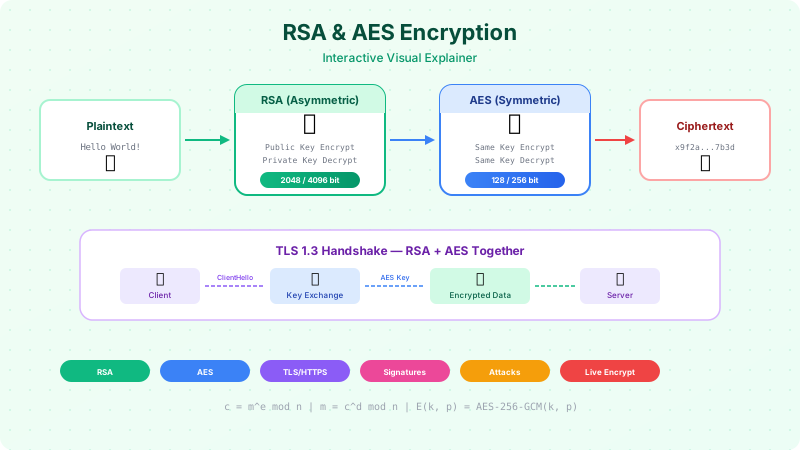
Encryption transforms readable data (plaintext) into unreadable data (ciphertext) using a mathematical algorithm and a key. The same key (or a paired key) reverses the process. RSA and AES take fundamentally different approaches — RSA uses the difficulty of factoring large primes; AES uses a substitution-permutation network that scrambles data through multiple rounds.
Encryption Pipeline — End to End
Click through each stage to see how data flows from plaintext to ciphertext.
Key Generation
Generate two large primes p and q (2048+ bits each). Compute n = p × q and φ(n) = (p-1)(q-1). Choose public exponent e (usually 65537). Compute private exponent d where e × d ≡ 1 mod φ(n).
RSA Summary
• Type: Asymmetric (two keys)
• Key sizes: 2048, 3072, 4096 bits
• Speed: Slow — used for small data only
• Used for: Key exchange, digital signatures
AES Summary
• Type: Symmetric (one shared key)
• Key sizes: 128, 192, 256 bits
• Speed: Very fast — hardware-accelerated
• Used for: Bulk data encryption
Math Proof & Foundations
You don't need a math degree to use encryption — but understanding the math gives you intuition forwhycertain key sizes are secure, why RSA is slow, and why AES is fast. RSA is built on number theory (prime factorization, modular arithmetic, Euler's theorem). AES is built on algebraic structures (finite fields, S-boxes, matrix multiplication in GF(2⁸)).
RSA Math — Step by Step
Walk through a complete RSA example with small numbers. Click each step.
AES Round Operations
Each of the 10/14 rounds applies these four transformations.
Each byte is replaced by looking it up in a fixed 16×16 substitution table (S-bo...
Row 0: no shift. Row 1: shift left by 1. Row 2: shift left by 2. Row 3: shift le...
Each column is multiplied by a fixed matrix in GF(2⁸). This spreads each input b...
XOR the state matrix with the round key. The round key is derived from the origi...
🧮 Why AES is secure: After just 4 rounds, every output bit depends on every input bit and every key bit. After 10+ rounds, there is no known mathematical shortcut faster than brute force. With AES-256, brute force requires 2²⁵⁶ operations — more than the atoms in the observable universe.
Types of Encryption
The encryption landscape has two fundamental categories: symmetric (one shared key) and asymmetric (public + private key pair). Within symmetric encryption, you further choose between block ciphers (AES) and stream ciphers (ChaCha20), and between different modes of operation (GCM, CBC, CTR). Each choice has real security implications.
Symmetric vs Asymmetric Encryption
Two fundamentally different approaches — and in practice, you use both together.
🔑 Symmetric (AES)
Alice
Same key for both
Bob
🔐 Asymmetric (RSA)
Alice
has 🔓 public
Encrypt with public, decrypt with private
Bob
has 🔐 private
| Property | Symmetric | Asymmetric |
|---|---|---|
| Keys | One shared secret key | Public key + Private key pair |
| Speed | ⚡ Very fast (hardware-accelerated) | 🐢 1000× slower than symmetric |
| Key Size | 128, 192, or 256 bits | 2048, 3072, or 4096 bits |
| Key Distribution | ❌ Hard — how do you share the key securely? | ✅ Easy — public key can be shared openly |
| Use Case | Bulk data encryption (files, disk, network) | Key exchange, digital signatures, certificates |
| Example | AES-256-GCM, ChaCha20-Poly1305 | RSA-2048, ECDSA, Ed25519 |
| Analogy | A padlock where both parties have copies of the same key | A mailbox: anyone can drop in (public key), only you can open it (private key) |
💡 In practice, you use BOTH: TLS uses RSA/ECDH to securely exchange an AES session key, then uses AES for the actual data encryption. This is called a hybrid cryptosystem — asymmetric for key exchange, symmetric for speed.
Block Ciphers vs Stream Ciphers
🧱 Block Cipher
Encrypts data in fixed-size blocks (e.g., 128 bits for AES). Each block is processed independently or chained together.
ECB
Each block encrypted independently. NEVER use — identical plaintext blocks produce identical ciphertext blocks.
CBC
Each block XORed with previous ciphertext before encryption. Requires IV. Vulnerable to padding oracle attacks.
CTR
Turns block cipher into stream cipher. Encrypts a counter, XORs with plaintext. Parallelizable.
GCM
⭐ Recommended. CTR mode + authentication tag. Provides both encryption AND integrity. Used in TLS 1.3.
Digital Signatures
Encryption provides confidentiality — only the intended recipient can read the message. Digital signatures provide authenticity (proof of who sent it) and integrity (proof it wasn't modified). They use asymmetric cryptography in reverse: sign with the private key, verify with the public key.
How Digital Signatures Work
Digital signatures prove who sent a message and that it wasn't modified. Click each step.
Hash the Message
The sender runs the message through a hash function (SHA-256). This produces a fixed-size 256-bit digest — a unique fingerprint of the message. Even changing one character produces a completely different hash.
🔒 Encryption
Encrypt with recipient's public key → Decrypt with recipient's private key.
Goal: Confidentiality — only the recipient can read it.
✍️ Signing
Sign with sender's private key → Verify with sender's public key.
Goal: Authenticity + Integrity — proves who sent it and that it wasn't modified.
Real-World Use Cases for Digital Signatures
Certificate Authorities sign TLS certificates with their private key. Browsers verify using the CA's public key.
The server signs JWTs with RS256 (RSA + SHA-256). APIs verify the token signature without contacting the auth server.
Developers GPG-sign commits to prove they authored the code. GitHub shows a "Verified" badge.
OS vendors sign updates with their private key. Your device verifies the signature before installing.
Legal documents are digitally signed for non-repudiation — the signer cannot deny they signed it.
Every transaction is signed with the sender's private key. Nodes verify using the public key (wallet address).
Data Encryption in Practice
Knowing the theory is one thing — applying it in production is another. Data needs protection in three states: at rest (stored on disk), in transit (moving over the network), and in use (in memory). Each state has different tools and tradeoffs.
Data Encryption in Practice
Four real-world patterns for encrypting data — at rest, in transit, and end-to-end.
Example
# Encrypt a file with OpenSSL (AES-256-GCM)
openssl enc -aes-256-gcm -salt -in secret.pdf -out secret.pdf.enc -pass pass:MyStrongPassword

# Decrypt
openssl enc -d -aes-256-gcm -in secret.pdf.enc -out secret.pdf -pass pass:MyStrongPassword

# Modern alternative: age (https://age-encryption.org)
age -r age1publickey... secret.pdf > secret.pdf.age
age -d -i key.txt secret.pdf.age > secret.pdf
📁 File Encryption
Encrypt files at rest before storing them on disk or cloud. Tools like GPG, OpenSSL, or age encrypt files with AES-256-GCM and wrap the key with RSA or a passphrase.
🌍 Real World
BitLocker (Windows), FileVault (macOS), LUKS (Linux) — all use AES-256 for full-disk encryption.
Interactive Encryption / Decryption
Time to see it in action. Type any message, choose AES-256-GCM or RSA-2048, and watch the encryption happen live in your browser. Everything runs client-side using the Web Crypto API — no data is sent to any server.
Live Encryption / Decryption
Type text, choose an algorithm, and encrypt it live in your browser using the Web Crypto API.
🔬 What just happened: A random 256-bit AES key and 96-bit IV were generated. Your text was encrypted with AES-256-GCM (authenticated encryption), then decrypted back using the same key. All in your browser — nothing sent to any server.
Code Snippets
Production-ready encryption and decryption code in four languages. Every example uses authenticated encryption (AES-GCM) and proper padding (RSA-OAEP). Copy these into your project as a starting point — they follow current best practices.
Working Code Examples
Production-ready encryption & decryption in 4 languages. Copy and use directly.
import javax.crypto.Cipher;
import javax.crypto.KeyGenerator;
import javax.crypto.SecretKey;
import javax.crypto.spec.GCMParameterSpec;
import java.security.SecureRandom;
import java.util.Base64;

public class AesGcmExample {
    private static final int GCM_TAG_LENGTH = 128;
    private static final int GCM_IV_LENGTH = 12;

    public static void main(String[] args) throws Exception {
        // Generate AES-256 key
        KeyGenerator keyGen = KeyGenerator.getInstance("AES");
        keyGen.init(256);
        SecretKey key = keyGen.generateKey();

        // Generate random IV
        byte[] iv = new byte[GCM_IV_LENGTH];
        new SecureRandom().nextBytes(iv);

        // Encrypt
        Cipher cipher = Cipher.getInstance("AES/GCM/NoPadding");
        cipher.init(Cipher.ENCRYPT_MODE, key,
            new GCMParameterSpec(GCM_TAG_LENGTH, iv));
        byte[] plaintext = "Hello, World!".getBytes("UTF-8");
        byte[] ciphertext = cipher.doFinal(plaintext);

        System.out.println("Ciphertext: " +
            Base64.getEncoder().encodeToString(ciphertext));

        // Decrypt
        cipher.init(Cipher.DECRYPT_MODE, key,
            new GCMParameterSpec(GCM_TAG_LENGTH, iv));
        byte[] decrypted = cipher.doFinal(ciphertext);
        System.out.println("Decrypted: " +
            new String(decrypted, "UTF-8"));
    }
}
⚠️ Security notes: Always use authenticated encryption (GCM mode for AES, OAEP padding for RSA). Never use ECB mode or PKCS1v15 padding for encryption. Generate new IVs/nonces for every encryption operation. Store keys securely — use key management services (AWS KMS, HashiCorp Vault) in production.
TLS & HTTPS
TLS (Transport Layer Security) is where RSA and AES work together in the real world. The TLS handshake uses asymmetric crypto (RSA/ECDH) to securely exchange a symmetric key, then uses AES for the actual data encryption. This hybrid approach gives you the best of both worlds: secure key exchange AND fast bulk encryption.
TLS Handshake — How RSA & AES Work Together
The TLS handshake is where asymmetric (RSA/ECDH) and symmetric (AES) encryption meet. Click through each message.
TLS 1.2 vs TLS 1.3
| Feature | TLS 1.2 | TLS 1.3 |
|---|---|---|
| Round-trips | 2 RTT | ✅ 1 RTT (0-RTT resumption) |
| Key Exchange | RSA or DHE | ✅ ECDHE only (no RSA key exchange) |
| Forward Secrecy | Optional (only with DHE/ECDHE) | ✅ Mandatory |
| Certificate | Sent in plaintext | ✅ Encrypted |
| Cipher Suites | 37+ suites (many insecure) | ✅ 5 suites (all secure) |
| Removed | Supports RC4, 3DES, SHA-1 | ✅ All removed |
| RSA Role | Key exchange + signing | Certificate signing only |
🔗 Certificate Chain of Trust
Root CA
Pre-installed in OS/browser
Intermediate CA
Signed by Root CA
Server Certificate
Signed by Intermediate CA
Your browser walks up this chain to verify each signature. If any link is broken or untrusted, you get the ⚠️ "Not Secure" warning.
Security Attacks
No encryption system exists in a vacuum. Understanding attack vectors is essential for choosing the right algorithms, modes, and configurations. Some attacks target the math (brute force), some target the implementation (timing attacks, padding oracles), and some target the protocol (MITM). Knowing the threats tells you exactly what to defend against.
Known Security Attacks
Understanding attack vectors is essential for choosing the right encryption configuration.
Brute Force
Try every possible key until the correct one is found. With AES-128, there are 2¹²⁸ possible keys — that's 340 undecillion. Even if every atom in the universe were a computer trying 1 billion keys per second, it would take longer than the age of the universe.
Attack Flow
🛡️ Defense
Use AES-256 (2²⁵⁶ keys) or RSA-2048+ (factoring is harder than brute force). Never use DES (56-bit key — crackable in hours).
All Attack Severity
How to Stay Safe
Encryption is only as strong as its weakest link — and that link is almost always the implementation, not the algorithm. AES-256 is unbreakable, but reusing a nonce with GCM is catastrophic. RSA-4096 is solid, but hardcoding the private key in your source code defeats the purpose entirely.
How to Stay Safe
The definitive do/don't list for production encryption.
Use AES-256-GCM for symmetric encryption
Authenticated encryption — provides confidentiality AND integrity in one operation. Hardware-accelerated on modern CPUs (AES-NI).
Use RSA-2048+ or Ed25519 for signatures
RSA-2048 is the minimum. RSA-4096 for long-term keys. Ed25519 is faster and uses shorter keys.
Use ECDHE for key exchange
Ephemeral Diffie-Hellman provides forward secrecy — past sessions stay safe even if the long-term key is compromised.
Generate a new IV/nonce for every encryption
Reusing a nonce with GCM is catastrophic — it leaks the authentication key. Always use crypto.getRandomValues() or /dev/urandom.
Use a Key Management Service (KMS)
AWS KMS, Google Cloud KMS, HashiCorp Vault, Azure Key Vault. Never store raw keys in source code, config files, or environment variables.
Rotate keys periodically
Limit the damage if a key is compromised. Re-encrypt data with new keys on a schedule (90 days for session keys, yearly for master keys).
Use constant-time comparison
When comparing MACs/signatures, use crypto.timingSafeEqual() (Node.js) or hmac.Equal() (Go). String === comparison leaks timing info.
Recommended Key Sizes (2024+)
| Algorithm | Minimum | Recommended | Post-Quantum |
|---|---|---|---|
| AES | 128-bit | 256-bit | Safe (128-bit effective) |
| RSA (encrypt) | 2048-bit | 3072-bit | ❌ Broken by Shor |
| RSA (signing) | 2048-bit | 4096-bit | ❌ Broken by Shor |
| ECDSA/ECDH | P-256 (128-bit) | P-384 (192-bit) | ❌ Broken by Shor |
| Ed25519 | 256-bit | 256-bit (fixed) | ❌ Broken by Shor |
| SHA-2 | SHA-256 | SHA-256 or SHA-384 | Safe (128-bit effective) |
Recommended Libraries by Language
Java
java.security + javax.crypto (JCE)
Built-in. Use Bouncy Castle for extended algorithms.
Python
cryptography (pyca)
pip install cryptography. Built on OpenSSL. Avoid PyCrypto (unmaintained).
TypeScript/JS
Web Crypto API / Node.js crypto
Built-in. Use libsodium.js for NaCl-style API.
Go
crypto/* (stdlib)
Excellent built-in library. crypto/aes, crypto/rsa, crypto/ecdsa.
Rust
ring / RustCrypto
ring for performance (used by rustls). RustCrypto for pure-Rust implementations.
C/C++
OpenSSL / libsodium
libsodium for simple API. OpenSSL for full TLS stack.
Real-World Use Cases
Every time you send a WhatsApp message, visit a website, push to GitHub, swipe your credit card, or unlock your laptop — RSA and AES are working behind the scenes. These aren't theoretical algorithms in a textbook. They're the foundation of digital trust for billions of people.
Real-World Use Cases
How RSA and AES power the systems you use every day.
WhatsApp End-to-End Encryption
WhatsApp uses the Signal Protocol to encrypt all messages, calls, photos, and videos for 2+ billion users. Messages are encrypted on your device and can only be decrypted by the recipient — WhatsApp/Meta cannot read them.
How It Works — Step by Step
Each user has an identity key pair (Curve25519) generated on first install
When Alice messages Bob, they perform X3DH (Extended Triple Diffie-Hellman) key agreement
A shared root key is derived → feeds into the Double Ratchet algorithm
Every single message gets a unique AES-256-CBC key (via HMAC-SHA256 chain)
Forward secrecy: compromising one key doesn't reveal past or future messages
Group chats: "Sender Keys" protocol — sender encrypts once, all members can decrypt
🔐 Cryptographic Stack
Curve25519 (key exchange) + AES-256-CBC (message encryption) + HMAC-SHA256 (authentication) + SHA-512 (hashing)