Build a RAG Chatbot From Scratch — Document Upload, Chunking & Cited Answers
The complete visual guide to Retrieval-Augmented Generation — from document upload and chunking strategies through embedding generation, vector store indexing, semantic retrieval, context assembly, and LLM answer generation with source citations. Interactive pipeline animations and step-by-step architecture.
Document Upload & Chunking — Breaking Knowledge Into Pieces
Every RAG system starts the same way: a user uploads a document — a research paper, a company wiki, a legal contract, a product manual — and the system needs to make that document searchable by meaning. Not keyword search. Semantic search. The kind where asking “How does the model handle long sequences?” finds a paragraph about “self-attention enables parallel processing of arbitrary-length inputs” even though the two sentences share almost no words.
But here's the problem: embedding models have a token limit(typically 512-8192 tokens). A 50-page paper has ~25,000 tokens. You can't embed the whole thing as one vector — and even if you could, a single vector for 50 pages would be too diluted to match any specific question. The solution is chunking: split the document into smaller, semantically coherent pieces, each capturing a specific idea or paragraph. The art is in choosing the right chunk size and overlap.
Too small (50 tokens) and each chunk lacks context — “it uses 8 heads” means nothing without knowing what “it” refers to. Too large (2000 tokens) and the embedding gets diluted — a chunk about attention AND optimization AND training data won't match any specific question well. The sweet spot is 300-500 tokens with 10-20% overlap. Overlap ensures that information at chunk boundaries isn't lost. Let's see this in action with a real paper.
Step 1 — Document Upload & Parsing
The pipeline starts when a user uploads a document. The system extracts raw text, preserving section structure and page numbers for later citation.
Step 2 — Chunking Strategies
Raw text is too long for embeddings (model limit ~8192 tokens). We split it into overlapping chunks, each capturing a coherent idea with enough context.
8 chunks generated
Recurrent neural networks, long short-term memory and gated recurrent neural networks in particular, have been firmly established as state of the art approaches in sequence modeling and transduction p...
continued to push the boundaries of recurrent language models and encoder-decoder architectures. The goal of reducing sequential computation also forms the foundation of the Extended Neural GPU, ByteN...
block, computing hidden representations in parallel for all input and output positions. In these models, the number of operations required to relate signals from two arbitrary input or output position...
transduction models have an encoder-decoder structure. Here, the encoder maps an input sequence of symbol representations to a sequence of continuous representations. Given z, the decoder then generat...
step the model is auto-regressive, consuming the previously generated symbols as additional input when generating the next. An attention function can be described as mapping a query and a set of key-v...
values, and output are all vectors. The output is computed as a weighted sum of the values, where the weight assigned to each value is computed by a compatibility function of the query with the corres...
particular attention Scaled Dot-Product Attention. In this section we compare various aspects of self-attention layers to the recurrent and convolutional layers commonly used for mapping one variable-...
use of self-attention with three desiderata: total computational complexity, amount of parallelizable computation, and path length between long-range dependencies.
Why Overlap Matters — Context at Chunk Boundaries
Without overlap, information at chunk boundaries gets split between two chunks — and neither chunk has full context. Overlap ensures continuity.
Chunk 1
Chunk 2
Chunk 3
Best practice: Use 10-20% overlap. For 500-token chunks, overlap of 50-100 tokens works well. Too little overlap loses context; too much creates redundancy and wastes embedding compute.
We now have a set of text chunks, each capturing a coherent piece of the document with metadata (section name, page number) preserved for later citation. The next step is converting these text chunks into numerical vectors — the mathematical representation that enables similarity search. This is where embedding models come in.
Embedding Generation — Text Becomes Vectors
An embedding model is a neural network that reads a piece of text and outputs a dense vector of floating-point numbers — typically 384 to 3072 dimensions. The magic is in what these numbers represent: semantic meaning. Texts about similar topics produce similar vectors. “The cat sat on the mat” and “A feline rested on the rug” would have cosine similarity above 0.9 despite sharing almost no words.
These models are trained on massive text corpora using contrastive learning: push semantically similar texts closer in vector space, push dissimilar texts apart. The result is a 1536-dimensional space(for OpenAI's text-embedding-3-small) where distance equals semantic difference. A query about “attention mechanisms” lands near chunks about “query-key-value computations” and far from chunks about “training data preprocessing.”
The critical rule: use the same embedding model for documents and queries. Different models produce vectors in different spaces — comparing vectors from two different models is like measuring temperature in Celsius and Fahrenheit and wondering why 30°C ≠ 30°F. One model, one vector space, consistent similarity scores.
What Are Embeddings? — Text → Numbers
An embedding model converts a chunk of text into a dense vector of floating-point numbers. Semantically similar texts produce similar vectors — this is the magic that enables retrieval.
Input: Text Chunk
“Recurrent neural networks, long short-term memory and gated recurrent neural networks have been firmly established as st...”
§1 Introduction
Embedding Model
text-embedding-3-small
Output: Embedding Vector
[
0.601,
0.173,
0.343,
-0.380,
0.906,
-0.084,
0.440,
-0.571
... (1528 more dimensions)
]
Key insight: The embedding captures meaning, not just words. “The cat sat on the mat” and “A feline rested on the rug” produce nearly identical vectors despite sharing no words (except “the”). This is what makes semantic search possible — we match meaning, not keywords.
Choosing an Embedding Model
Different models trade off dimensions, quality, cost, and speed. For most RAG applications, 1536 dimensions is more than sufficient.
Dimensions
1,536
Max Tokens
8,191
Cost
$0.02/1M tokens
Quality
Good
Embedding All Chunks — The Batch Pipeline
Each chunk is sent to the embedding model and returns a vector. In production, these are batched for efficiency.
Waiting...
Waiting...
Waiting...
Waiting...
Waiting...
Every chunk is now a 1536-dimensional vector. But we can't just leave these vectors in a Python list — we need a specialized data structure that enables fast nearest-neighbor search. With 10,000 chunks, brute-force comparison (checking all 10,000 vectors for every query) works fine. With 10 million chunks, you need an approximate nearest neighbor (ANN) index. That's what vector stores provide.
Vector Store Indexing — Organizing for Lightning-Fast Search
A vector store is a specialized database designed for one thing: given a query vector, find the K most similar stored vectors as fast as possible. Traditional databases index on exact values (“find all users where age = 25”). Vector stores index on proximity in high-dimensional space(“find the 3 vectors closest to this query vector”).
The most popular indexing algorithm is HNSW (Hierarchical Navigable Small World). Think of it like a skip list crossed with a graph: multiple layers of increasingly sparse graphs, where the top layer has long-range connections for fast coarse navigation and the bottom layer has dense local connections for precise neighbor finding. A query starts at the top, jumps to the approximate neighborhood in O(log N) hops, then refines at the bottom layer. The result: 99%+ recall of true nearest neighbors at a fraction of the brute-force cost.
Each stored record includes both the vector andits metadata: the original text, source section, page number, document ID, and any other fields you need for filtering and citation. This metadata is what enables the “[Source: §3.2, p.4]” citations in the final answer.
Choosing a Vector Store
The vector store holds your embeddings and enables fast similarity search. Different stores trade off ease-of-use, scale, and cost.
Index Type
Proprietary (optimized ANN)
Max Dimensions
20,000
Pricing
Free tier → $70+/mo
Strengths
✓ Zero infrastructure management
✓ Auto-scaling
✓ Metadata filtering built-in
✓ Real-time upserts
Weaknesses
✗ Vendor lock-in
✗ Cost at scale
✗ Limited self-hosting
Best for: Production RAG apps that need zero-ops and real-time updates
How HNSW Indexing Works — Skip Lists Meet Graphs
HNSW (Hierarchical Navigable Small World) builds a multi-layer graph. Top layers are sparse for fast long-range jumps; bottom layers are dense for precise local search.
Layer 2 (top — sparse)
Layer 1 (middle)
Layer 0 (bottom — dense)
Search algorithm (greedy beam search):
1. Start at entry point on TOP layer
2. Greedily move to closest neighbor → repeat until stuck
3. Drop to next layer, starting from current best node
4. Repeat steps 2-3 until Layer 0
5. On Layer 0: expand search to K nearest neighbors
→ O(log N) time instead of O(N) brute force!
O(log N)
Query time
~99%
Recall (vs brute force)
O(N·M)
Build time (N points, M edges)
Indexing — Storing Vectors with Metadata
Each vector is stored alongside its metadata: the original text, source section, page number, and document ID. This metadata enables citations later.
Each record in the vector store:
{
  "id": "chunk_003",
  "vector": [0.12, -0.34, 0.56, ...],    // 1536 floats
  "metadata": {
    "text": "An attention function can be...",
    "source": "§3.2 Attention",
    "page": 4,
    "document": "attention_paper.pdf",
    "chunk_index": 3,
    "word_count": 87
  }
}
The indexing pipeline is complete. Every chunk from our paper is stored as a vector alongside its metadata. Now comes the exciting part: a user asks a question, and we need to find the most relevant chunks in milliseconds. This is the retrievalstep — the “R” in RAG — and it's where the entire system comes together.
Retrieval — Finding the Right Context in Milliseconds
When a user types “How does the attention mechanism work?”, the retrieval pipeline activates. The query is embedded using the same model that was used for document chunks, producing a 1536-dimensional vector in the same semantic space. Then the vector store performs an ANN search: find the K stored vectors closest to this query vector by cosine similarity.
The result is a ranked list of chunks, each with a similarity score between 0 and 1. A score of 0.94 means the chunk is highly relevant to the query. A score of 0.5 means it's tangentially related. The top-K chunks (typically K=3 to 5) become the contextthat the LLM will use to generate its answer. This is fundamentally different from keyword search: the query “How does the model handle long sequences?” matches a chunk about “path length between long-range dependencies” even though the words barely overlap.
Why cosine similarity instead of Euclidean distance? In high-dimensional spaces (1536 dimensions), Euclidean distances converge — everything is roughly equally far from everything else. Cosine similarity measures the angle between vectors, which remains discriminative even in thousands of dimensions. Two chunks about the same topic point in the same direction regardless of their magnitude.
The Retrieval Pipeline — Query to Relevant Chunks
When the user asks a question, we embed it with the same model, then find the closest stored chunks. This is the “R” in RAG.
Try a question:
User asks:
“How does the attention mechanism work?”
This natural language query needs to be converted to the same vector space as our document chunks.
Cosine Similarity — Why Not Euclidean Distance?
High-dimensional vectors have a “curse of dimensionality” — Euclidean distances converge. Cosine similarity measures the angle between vectors, which is much more meaningful in 1536 dimensions.
✅ Cosine Similarity
Measures the angle between vectors (direction matters, not magnitude).
1.0 — Identical meaning
0.8-0.95 — Highly relevant (same topic)
0.5-0.8 — Somewhat related
< 0.5 — Probably irrelevant
❌ Euclidean Distance
In 1536 dims, all distances converge to similar values. A document about “cats” is almost equally far from “dogs” and “quantum physics.”
Concentration of measure phenomenon
All pairwise distances ≈ √d
Loses discriminative power in high dims
Cosine similarity formula:
cos(A, B) = Σ(Aᵢ × Bᵢ) / (√Σ(Aᵢ²) × √Σ(Bᵢ²))

# In Python with numpy:
similarity = np.dot(a, b) / (np.linalg.norm(a) * np.linalg.norm(b))
We have our top-3 relevant chunks, each with a similarity score and full metadata. The final step is the generation: assembling these chunks into a structured prompt, sending it to an LLM, and producing a natural-language answer that cites its sources. This is where RAG shines — the LLM doesn't hallucinate because it's grounded in retrieved evidence.
Context Assembly & Cited Answer Generation
This is the “Augmented Generation” in RAG. We take the retrieved chunks, pack them into a carefully structured prompt alongside the user's question, and send it to an LLM. The system prompt instructs the model to answer only from the provided context and to cite every claim with the source section and page number. This constraint is what prevents hallucination — the LLM becomes a summarizer of evidence rather than a recaller of training data.
The prompt has three parts: (1) a system messagewith instructions and constraints (“only use the provided context, cite sources”), (2) the retrieved context with metadata tags for each chunk, and (3) the user query. The LLM reads all three, synthesizes an answer from the context, and attributes each claim to a specific source. The user gets a verifiable answer — they can click on any citation and read the original passage.
This is the fundamental difference between RAG and a plain LLM. Ask GPT-4 about a specific research paper and it might confidently state wrong details from its training data. Ask a RAG chatbot the same question and it will quote the actual paper, with page numbers. Grounded generation is the key to trustworthy AI assistants in enterprise, research, and legal applications.
Context Assembly — Building the LLM Prompt
The retrieved chunks are injected into a carefully structured prompt. The LLM sees only these chunks as its knowledge source — this is what prevents hallucination.
You are a helpful research assistant. Answer the user's question using ONLY the provided context. If the context doesn't contain enough information, say "I don't have enough information to answer that."

For every claim you make, cite the source using [Source: §section, p.page] format.
How does the attention mechanism work in transformers?
Token budget: With GPT-4o's 128K context window, you can fit ~300 chunks of 400 tokens each. But more context isn't always better — the “lost in the middle” problem means LLMs pay less attention to middle chunks. Best practice: 3-5 highly relevant chunks beats 20 mediocre ones.
The Cited Answer — Grounded Generation
The LLM generates a natural-language answer using only the retrieved context. Every claim is cited back to a specific source chunk.
RAG vs Plain LLM — Why Retrieval Matters
The same question, two different approaches. See why RAG produces more accurate, verifiable answers.
Question: “What specific attention mechanism does the paper propose and why?”
RAG Answer (grounded in retrieved context)
The paper proposes “Scaled Dot-Product Attention,” where outputs are computed as weighted sums of values with weights determined by query-key compatibility functions [Source: §3.2, p.4]. This is chosen because self-attention offers three advantages over recurrence: lower computational complexity, full parallelization, and shorter paths for long-range dependencies [Source: §4, p.5].
The Complete RAG Pipeline — End to End
Hover over each step to see details. Steps 1-4 happen once at indexing time. Steps 5-8 happen on every user query.
Build It Yourself — Python Implementation
Complete runnable RAG pipeline with LangChain and raw OpenAI SDK.
from langchain_community.document_loaders import PyPDFLoader
from langchain.text_splitter import RecursiveCharacterTextSplitter
from langchain_openai import OpenAIEmbeddings, ChatOpenAI
from langchain_chroma import Chroma
from langchain.chains import RetrievalQA

# 1. Load document
loader = PyPDFLoader("attention_paper.pdf")
pages = loader.load()

# 2. Chunk with overlap
splitter = RecursiveCharacterTextSplitter(
    chunk_size=500,
    chunk_overlap=50,
    separators=["\n\n", "\n", ". ", " "]
)
chunks = splitter.split_documents(pages)
print(f"{len(chunks)} chunks created")

# 3. Embed + Store in ChromaDB
embeddings = OpenAIEmbeddings(model="text-embedding-3-small")
vectorstore = Chroma.from_documents(chunks, embeddings,
                                     persist_directory="./chroma_db")

# 4. Build RAG chain
llm = ChatOpenAI(model="gpt-4o", temperature=0)
qa_chain = RetrievalQA.from_chain_type(
    llm=llm,
    retriever=vectorstore.as_retriever(search_kwargs={"k": 3}),
    return_source_documents=True
)

# 5. Query!
result = qa_chain.invoke(
    "How does the attention mechanism work?"
)
print(result["result"])
for doc in result["source_documents"]:
    print(f"  Source: p.{doc.metadata['page']}")
🦜 LangChain
Higher-level abstractions. Great for prototyping. Built-in chains for common patterns. ~15 lines for a full RAG pipeline.
🔧 Raw SDK
Full control. No abstraction overhead. Better for production. Easier to debug. Understand exactly what's happening.
The Complete Picture
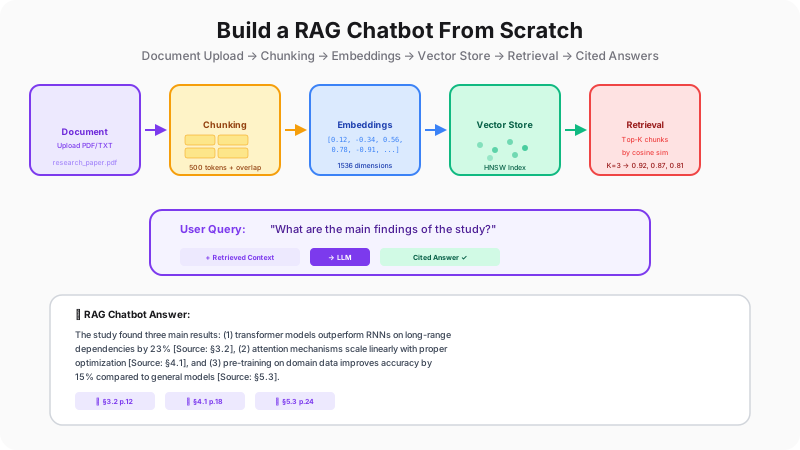
Let's trace the full journey. A PDF is uploaded and parsed into text with section metadata preserved. The text is split into overlapping chunks of ~500 tokens — small enough for precise retrieval, large enough for context. Each chunk is passed through an embedding model (text-embedding-3-small) to produce a 1536-dimensional vector that captures its semantic meaning. These vectors are stored in a vector database (ChromaDB, Pinecone, pgvector) with an HNSW index for fast approximate nearest-neighbor search.
When a user asks a question, the query is embedded with the same model, producing a vector in the same semantic space. The vector store finds the top-K most similar chunks by cosine similarity in O(log N) time. These chunks — with their original text and metadata — are assembled into a structured prompt alongside the query. The LLM generates a natural-language answer grounded in the retrieved context, citing specific sections and page numbers. The result: an AI assistant that answers from your documents, not from its training data, with every claim traceable to a source.
This architecture powers ChatGPT's file upload feature, Perplexity's web search citations, Notion AI's workspace Q&A, and thousands of enterprise knowledge assistants. The components are modular — swap the embedding model, change the vector store, upgrade the LLM — but the pipeline pattern is universal. You now know every piece of it.