Prompt Engineering — Real Life Use Cases
Master prompt engineering from first principles. Interactive guide covering prompt anatomy, types, chain-of-thought, temperature tuning, and a live AI playground.
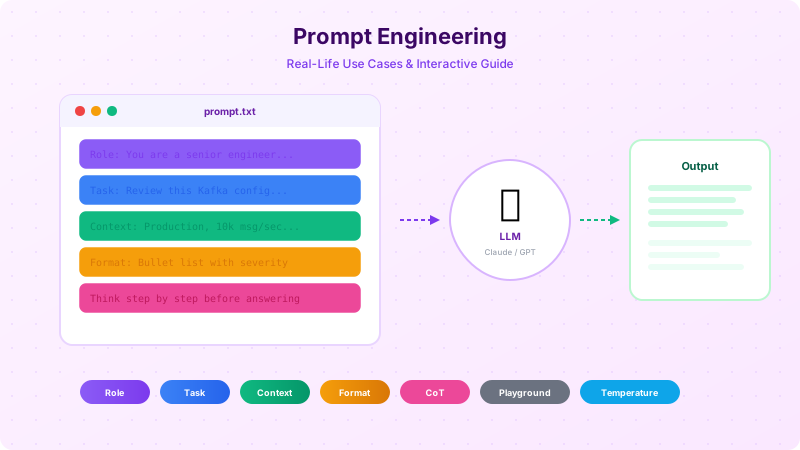
What is Prompt Engineering?
Prompt engineering is the skill of communicating with AI models effectively. It's the difference between getting a vague, generic response and getting exactly the expert-level output you need.
Think of it like this: if an AI model is a brilliant but literal-minded colleague who just joined your team, prompt engineering is how you write the perfect Jira ticket for them. Vague tickets get vague results. Detailed, well-structured tickets with clear acceptance criteria get exactly what you want.
Why does it matter?
The same AI model — whether it's Claude, GPT-4, or Gemini — can produce dramatically different outputs depending on how you ask. A poorly-written prompt wastes tokens, produces hallucinations, and requires multiple back-and-forth corrections. A well-engineered prompt gets it right on the first try.
In enterprise contexts, this isn't academic — it directly affects developer productivity, code quality, and the reliability of AI-assisted workflows. A senior engineer who masters prompt engineering can 10× their output using AI tools. One who doesn't will constantly complain that "AI gives bad answers."
The Real-World Analogy
Imagine you walk into a hospital and say: "I feel bad." The doctor has almost nothing to work with. But if you say: "I've had a sharp pain in my lower right abdomen for 48 hours, it gets worse when I walk, I have a fever of 101°F, and I haven't eaten in 2 days" — the doctor can immediately narrow down the diagnosis.
AI models work the same way. They're not mind readers. The more precise and structured your input, the more accurate and useful their output.
Weak vs Strong Prompts
Same task, vastly different results. Click an example to compare.
Output
Output
Anatomy of a Perfect Prompt
Every effective prompt has four core components. You don't always need all four — but the more complex the task, the more components you should include. Think of these as layers you stack on top of each other.
The magic isn't in any single component — it's in how they work together. A Role without a Task is an introduction with no purpose. A Task without Context is an instruction with no information. A Format without everything else is just asking for a pretty version of garbage.
Anatomy of a Perfect Prompt
Every great prompt has four components. Click each one to explore.
You are a senior backend engineer at bKash with 10 years of experience in distributed payment systems.
Review this Kafka consumer configuration for our payment-processing pipeline and identify potential issues.
Production environment: Kafka 3.6, 3 brokers, 12 partitions, Spring Boot 3.2 consumers. Peak load: 10,000 transactions/sec. Current consumer lag: 50,000 messages during 6-8 PM.
Return a prioritized list grouped by severity: Critical > Warning > Info. For each issue, include the specific config key, current value, recommended value, and the reason for the change.
Role
Component
Tells the model WHO it should be. This activates domain-specific knowledge and adjusts the tone, vocabulary, and depth of the response. A "senior backend engineer" will give very different advice than a "product manager" or "junior developer".
Pro Tips
- ●Be specific about expertise level
- ●Mention the domain (fintech, healthcare, etc.)
- ●Include years of experience for calibration
How It Works — Under the Hood
To engineer great prompts, it helps to understand what's actually happening inside the model. You don't need a PhD in machine learning — just a mental model of the process.
The key insight: LLMs don't "understand" your prompt like a human does. They process it as a sequence of tokens and predict the most likely next token, one at a time. This is why word choice, order, and structure matter so much — they directly influence the probability distribution of the output.
When you write "You are a senior engineer", you're not giving the model a personality. You're shifting the probability distribution so that tokens associated with expert-level technical content become more likely in the output.
Token-by-Token Prediction
LLMs don't understand sentences — they predict the next token, one at a time. Click any token to see what the model considers next.
After "how" — top 4 predicted next tokens:
Why word choice matters:Each token you write shifts these probabilities. Writing "Kafka" vs "messaging" as context completely changes what the model predicts next — and therefore the entire response trajectory.
The Processing Pipeline
What happens between your prompt and the response
Types of Prompts
Not all tasks are the same, and not all prompts should be the same. Here are the six fundamental prompt types every engineer should know. Each is suited for different situations — and knowing which to use is half the battle.
The examples below are from real engineering and fintech contexts — not "write a poem about dogs." Because prompt engineering only matters when the stakes are real.
Types of Prompts
Six fundamental techniques — each suited for different situations.
What is it?
No examples provided — the model relies entirely on its training data and your instructions.
When to use
Simple, well-defined tasks where the model already has strong built-in knowledge.
Prompt
Output
Chain of Thought (CoT)
Chain of Thought is the single most powerful technique in prompt engineering for complex tasks. The idea is simple: instead of asking the model to jump straight to the answer, you ask it to show its reasoning step by step.
Why does this work? Because LLMs generate tokens sequentially. When the model writes out intermediate reasoning steps, those tokens become part of the context for subsequent tokens. The model is literally "thinking on paper" — and each step constrains the next one toward a more accurate conclusion.
Research from Google Brain showed that CoT prompting improved accuracy on math word problems from 17.7% to 58.1% on the GSM8K benchmark. For complex multi-step engineering problems, the improvement is even more dramatic.
Chain of Thought (CoT)
Adding "think step by step" to your prompt dramatically improves accuracy on complex reasoning tasks. Here's proof.
Model Output
Reusable CoT Trigger Templates
Copy these and append to any complex prompt. Click to copy.
Temperature & Parameters
Temperature is the most important parameter you can tune beyond the prompt itself. It controls how random the model's token selection is.
At temperature 0.0, the model always picks the highest-probability next token — deterministic and consistent. At temperature 2.0, the probability distribution is flattened so dramatically that unlikely tokens become almost as probable as likely ones — creative but chaotic.
The right temperature depends entirely on your task. Code generation? Keep it at 0. Brainstorming marketing copy? Crank it up. The interactive demo below shows exactly how the same prompt produces different outputs at each level.
Temperature Playground
Same prompt, different temperatures. Slide to see how randomness affects the output.
Prompt
Explain why microservices fail at early-stage startups in one paragraph.
Here's the uncomfortable truth: microservices at an early-stage startup are essentially a team of 4 engineers cosplaying as Google. You're building distributed systems infrastructure instead of features. Every "simple" change now requires a PR in three repos, a contract negotiation between services, and a prayer that the eventual consistency model doesn't eat a customer's payment. Meanwhile, your competitor with a Django monolith shipped the same feature during their lunch break. The irony? By the time you actually need microservices, you'll want to redesign them anyway because your domain boundaries were wrong.
How temperature works: At temp=0, the model always picks the highest-probability token. Higher temperatures flatten the probability distribution, making lower-probability (more surprising) tokens more likely to be chosen. This increases creativity but also increases the risk of incoherent output.
Recommended Temperature by Task
| Task Type | Temperature | Why |
|---|---|---|
| Code generation | 0.0 – 0.2 | Deterministic, correct syntax required |
| Bug analysis | 0.0 – 0.3 | Factual accuracy matters most |
| Technical writing | 0.3 – 0.5 | Slight variation keeps it natural |
| Brainstorming | 0.7 – 1.0 | Diversity of ideas is the goal |
| Creative copywriting | 0.8 – 1.2 | Unexpected phrasing adds flair |
| Storytelling | 1.0 – 1.5 | Maximum creativity and surprise |
The Prompt Engineering Workflow
Now that you know all the techniques, how do you actually apply them in practice? Here's a systematic 6-step framework that works for any task — from a quick code review to a complex architecture decision.
The key insight: prompt engineering is not a one-shot activity.It's an iterative process. Your first prompt is a draft. Each iteration tightens the output toward exactly what you need.
Prompt Engineering Workflow
A 6-step decision framework. Click each step to explore, check them off as you master them.
Step 1
Define Your Goal
What exactly do you want the AI to produce?
❌ Common Mistake
I want help with my code
✅ Better Approach
I need a code review of my Spring Boot REST controller that identifies security vulnerabilities and performance bottlenecks
💡 Pro Tip: Be specific about the deliverable. "Help with code" has a million interpretations. "Security-focused code review" has one.
Checklist
Live Playground
Time to put everything together. Use the snippet buttons to build a prompt from components, or start from one of the starter templates. Then send it to Claude and see the results in real time.
You'll need your own Anthropic API key to use this playground. The key is used client-side only and is never stored or sent anywhere except directly to the Anthropic API.
Live AI Playground
Build a prompt using snippets, then send it to Claude. Requires your own Anthropic API key.