KV Cache Explained
Understand how KV caching makes LLM inference fast and cheap — transformer attention mechanics, prompt prefix caching, Anthropic vs OpenAI implementations, PagedAttention, and GPU memory optimization with interactive demos.
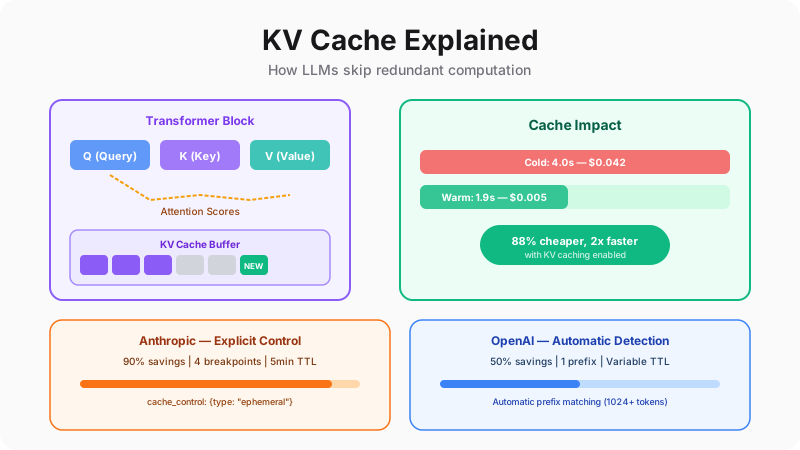
Why Your Second Message Is Faster
You've probably noticed this already: the first message in a conversation with Claude or ChatGPT takes a beat longer than the ones that follow. Your second, third, and fourth messages feel noticeably snappier. Most people chalk this up to network conditions or server load. But it's actually something far more interesting — a technique called KV caching that fundamentally changes the economics of running large language models.
Here's the short version: when a transformer processes your first message, it computes mathematical representations (called Key and Value vectors) for every single token in the conversation — your system prompt, any context, and your message. This is expensive work. But those vectors don't change once computed. So the model stores them. When your second message arrives, it doesn't redo all that math — it just looks up the cached vectors and only computes the new tokens. The result? 2-10x faster responses and up to 90% cost reduction on cached portions.
This isn't a minor optimization. At Anthropic's and OpenAI's scale — serving millions of requests per minute — KV caching is the difference between viable and unviable economics. And for developers building on these APIs, understanding it unlocks dramatic cost savings. Let's start by watching it in action.
The Race: Cold vs Warm Request
Watch both requests process simultaneously. The KV cache makes the second request skip recomputation.
Cold Request Cost
$0.042
Full computation
Warm Request Cost
$0.005
88% cheaper with cache
Scale Impact Calculator
See how much KV caching saves at scale.
Monthly Cost Without Caching
$75,600
6.0M requests × 4200 tokens
Monthly Cost With Caching
$3,960
Cache read at 10% cost
You Save
$71,640/month
$859,680/year
How Transformers Compute Attention
To truly understand why KV caching works — and why it's so effective — you need to understand what transformers are actually doing under the hood. Don't worry, we'll build this up from first principles and you'll see why the “Key” and “Value” in “KV cache” refer to specific mathematical objects in the attention computation.
Every transformer layer performs the same fundamental operation: for each new token being generated, it asks “how much should I pay attention to each previous token?” The answer comes from computing three vectors per token — Query (what am I looking for?), Key (what do I contain?), and Value (what information do I carry?). The Query of the new token is compared against the Keys of all previous tokens to produce attention weights. Those weights are then used to create a weighted sum of the Values.
Here's the critical insight: the Keys and Values of previous tokens never change. Token #3's Key vector is identical whether we're generating token #4 or token #400. So why would we recompute it every single time? We wouldn't — and that's exactly what the KV cache prevents. Each token's K and V vectors are computed once and stored. Only the new token needs fresh computation. Step through the interactive diagram below to see this in real time.
Transformer Attention with KV Cache
Step through token generation. See how the KV cache avoids recomputing previous tokens.
Transformer Block — Step 1/6
Input Tokens
Q (Query) — new token only
K (Keys) — all tokens
V (Values) — all tokens
Attention: Q[The] attends to all Keys
Output: weighted sum of Values → next token prediction
KV Cache Buffer
✅ Only K0/V0 computed. 0 pairs reused from cache.
KV Cache Size Calculator
Calculate how much GPU memory the KV cache consumes for a given model architecture.
Formula
2 × 32 layers × 32 heads × 128 dim × 4,096 seq × 2 bytes
= 2.15 GB per request
Now you can see the math: without a cache, generating token N requires computing 2×N×L×H×D floating point operations (where L is layers, H is heads, D is head dimension). With a cache, it's just 2×1×L×H×D — only the new token. For a 100-token generation on a 32-layer model, that's a 100x reduction in redundant computation. But this local, per-request caching is just the beginning. What if multiple API requests share the same prefix?
Prompt Prefix Caching — The API-Level Game Changer
Here's where things get really interesting — and where your API bills start dropping dramatically. Think about a typical production application: every request to your AI customer service agent starts with the same 4,000-token system prompt. Every RAG query includes the same few-shot examples. Every code assistant embeds the same repository context. That's thousands of tokens being reprocessed from scratch on every single request, costing you the same amount each time.
Prompt prefix caching takes the per-request KV cache concept and elevates it to the infrastructure level. When Anthropic or OpenAI detects that your request shares a prefix with a recent previous request (same system prompt, same context), they skip recomputing those KV vectors entirely. The cached portion is read from server-side storage at a fraction of the cost —90% cheaper with Anthropic, 50% cheaper with OpenAI.
The implications are massive. If your system prompt is 4,000 tokens and your user message is 100 tokens, prefix caching means you only pay full price for those 100 new tokens. The 4,000-token prefix? Cached and served at 10% cost. For a business making 100,000 API calls per day, this is the difference between a $30,000/month bill and a $4,000/month bill. Let's see exactly how this works.
Two-Request Sequence
Watch how the second request skips recomputing the cached prefix — only the user message is processed.
Cache Breakpoint Optimizer
Drag the breakpoint to optimize cache placement. Static content goes left, dynamic content stays right.
Cache Savings
63%
Dynamic (per request)
2,124
tokens computed fresh
API Implementation
import anthropic

client = anthropic.Anthropic()

response = client.messages.create(
    model="claude-sonnet-4-20250514",
    max_tokens=1024,
    system=[
        {
            "type": "text",
            "text": "You are a helpful coding assistant...",
            "cache_control": {"type": "ephemeral"}  # ← Cache this
        }
    ],
    messages=[
        {"role": "user", "content": "Explain KV caching"}
    ]
)

# Check cache usage in response
print(response.usage)
# cache_creation_input_tokens: 2048  (first call)
# cache_read_input_tokens: 2048     (subsequent calls)
# input_tokens: 15                   (uncached tokens)
Usage Breakdown (Pie Chart)
On cache hit: 2048 tokens read at 10% cost = $0.0006 instead of $0.006
The key architectural insight here is that caching only works for prefixes— the static portion at the beginning of your prompt. The moment content diverges from the cached version (your dynamic user message), caching stops. This means prompt engineering for cache efficiency is about putting stable content first and variable content last. System prompt → few-shot examples → retrieved context → user message. Get this ordering right and you're saving 80-90% on the bulk of your tokens. But Anthropic and OpenAI implement this very differently — let's compare.
Anthropic vs OpenAI — Two Philosophies of Caching
Both major providers offer prompt caching, but their implementations reflect fundamentally different design philosophies. Anthropic says: “You know your application best — tell us exactly what to cache, and we'll give you 90% savings and full visibility.” OpenAI says: “Don't worry about it — we'll automatically detect repeated prefixes and give you 50% savings with zero configuration.”
Neither approach is universally better — it depends on your use case. If you have a stable, predictable system prompt and high request volume, Anthropic's explicit caching saves dramatically more money. If your prompts vary frequently or you want zero engineering overhead, OpenAI's automatic approach is simpler. The comparison below breaks down every dimension — cost, control, TTL, visibility — so you can make an informed choice for your specific architecture.
Anthropic vs OpenAI — Cache Implementation
Not a simple table — a visual feature-by-feature comparison.
Anthropic
Explicit Cache Control
OpenAI
Automatic Prefix Caching
Explicit cache_control marker
You choose exactly what to cache
Automatic prefix detection
System detects repeated prefixes
Any length
No minimum — even short prompts cacheable
1,024 token minimum
Short prompts cannot be cached
5 minutes, refreshes on hit
Predictable TTL, resets each use
Minutes to hours (variable)
No guaranteed TTL, opaque behavior
90% savings (10% of normal)
Pay only 10¢ per $1 of cached tokens
50% savings (50% of normal)
Pay 50¢ per $1 of cached tokens
Explicit token counts in response
cache_read_input_tokens in API response
Inferred from pricing only
No explicit cache metrics in response
4 breakpoints per request
Fine-grained control over cache segments
1 implicit prefix
Only the longest common prefix is cached
25% premium on first write
Amortized over subsequent reads
No write premium
Cache writes are free
🔑 Key Takeaway: Anthropic gives you explicit control with 90% savings and full visibility. OpenAI is zero-effort with 50% savings but less control. For high-volume applications with stable system prompts, Anthropic's explicit caching saves significantly more.
Which Strategy Saves More?
Anthropic (Explicit Cache)
$900
/month
OpenAI (Auto Cache)
$900
/month
✅ CheaperDifference
$0/month saved with OpenAI
One pattern I've seen work well in production: use Anthropic's explicit caching for your high-volume, latency-sensitive endpoints (customer-facing chat, code completion) where the savings compound dramatically. Use OpenAI for exploratory, variable workloads (internal tools, one-off analysis) where the zero-configuration ease matters more than maximum savings. But regardless of which provider you choose, both face the same fundamental infrastructure challenge: the KV cache is a memory monster. Let's look at what happens inside the GPU.
GPU Infrastructure — The Memory Bottleneck
Here's a fact that surprises most developers: the KV cache — not the model weights — is the #1 memory bottleneck when serving LLMs in production. A 70B parameter model takes ~140GB in FP16 (spread across multiple GPUs). But the KV cache for a single 128K-token request on that model? Over 40GB of GPU memory. For one request. Now imagine serving 32 concurrent users. The math doesn't work without clever engineering.
This is why frameworks like vLLM and TensorRT-LLM exist. They solve the KV cache memory problem using a technique called PagedAttention— inspired by how operating systems manage virtual memory. Instead of allocating one giant contiguous block per request (which wastes memory through fragmentation), PagedAttention breaks the cache into fixed-size pages that can be allocated on demand and shared across requests. The result: 40% more concurrent users on the same hardware, with zero quality loss. If you're self-hosting models or evaluating inference providers, understanding this layer is essential.
GPU Memory Partition (A100 80GB)
As sequence length grows, KV cache consumes more memory — reducing concurrency.
KV Cache per Request
20.5 GB
Max Concurrent Requests
1
(21.5GB free ÷ 20.5GB per req)
⚠️ KV cache consuming 26% of GPU memory — severe concurrency bottleneck!
PagedAttention (vLLM)
Traditional KV cache uses contiguous blocks with fragmentation waste. PagedAttention uses fixed-size pages — like virtual memory for attention.
❌ Without PagedAttention (Contiguous)
✅ With PagedAttention (Paged)
Result
~40% more requests served with same memory
4 → ~5 concurrent requests
Inference Server Capacity Planner
Without PagedAttention
1
max concurrent requests
With PagedAttention
1
max concurrent requests
⚠️ Target concurrency (32) exceeds capacity (1). Consider: shorter sequences, smaller model, or more GPU memory.
Putting It All Together
Let's zoom out and connect everything we've covered. At the math level, KV caching avoids redundant computation by storing Key and Value vectors that never change. At the API level, prefix caching extends this across requests — shared system prompts are computed once and reused thousands of times. At the infrastructure level, PagedAttention solves the memory fragmentation problem that would otherwise limit concurrency.
Together, these three layers make large language models economically viable to serve. Without per-request KV caching, generation would be 100x slower. Without prefix caching, API costs would be 5-10x higher for production workloads. Without PagedAttention, inference providers would need 3-5x more GPUs to serve the same traffic. Understanding this stack — from attention math to GPU memory management — makes you a fundamentally stronger AI engineer. You now know not just what to cache, but why it works, how to optimize it, and where the real bottlenecks live.