How HTTPS & SSH Work Internally
Deep-dive into HTTPS and SSH internals — TLS 1.3 handshake, DNS resolution, certificate chains, root CAs, MITM attacks, SSH key exchange, and security best practices with interactive demos.
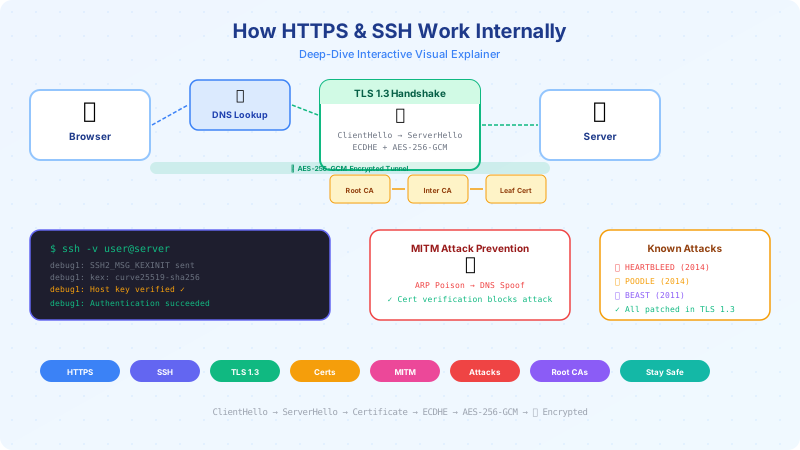
The Big Picture — Why Secure Communication Exists
The internet was built on trust. Early protocols like HTTP, FTP, and Telnet sent everything in plaintext — passwords, emails, credit card numbers — visible to anyone on the same network. HTTPS and SSH exist to solve three fundamental problems: confidentiality (no one else can read it), integrity (no one modified it), and authentication(you're talking to who you think you are).
Postcard vs Sealed Envelope
Plain HTTP is like sending a postcard — every mail carrier can read it. HTTPS is a sealed envelope with a lock only the recipient can open.
✉️ Message written on the outside of a postcard
👀 Every relay point (router, ISP, WiFi hotspot) can read it
✏️ Anyone in the middle can modify it
🎭 No proof the sender is who they claim to be
✉️ Message sealed in a tamper-proof envelope
🔐 Only the intended recipient has the key to open it
🛡️ Any modification is instantly detected
📜 Certificate proves the server's identity
What an Attacker Sees on the Wire
Toggle to see the same banking request as plaintext HTTP vs HTTPS-encrypted.
// ⚠️ EVERYTHING IS VISIBLE TO THE ATTACKER

GET /api/account/balance HTTP/1.1
Host: bank.example.com
Cookie: session=eyJhbGciOiJIUzI1NiJ9...
Authorization: Bearer sk_live_4eC39HqLyjWDarj
Content-Type: application/json

{"account_id": "ACC-9182736", "pin": "4529"}
🔑 Key Takeaway: Without HTTPS, anyone on the same WiFi network, your ISP, or any router between you and the server can read, copy, and modify every byte you send — including passwords, tokens, and personal data.
DNS — The Internet's Phone Book
Before any HTTPS connection can begin, your browser needs to translate a domain name like google.cominto an IP address. This is DNS — the Domain Name System — a hierarchical, distributed database that resolves human-readable names to machine-readable addresses. It's the first step in every web request, and it's also a prime target for attackers.
DNS Resolution Chain
How your browser resolves google.com to an IP address — click through each hop.
Browser Cache
~0msBrowser checks its own DNS cache first. If you visited google.com recently, the IP is already stored locally. Chrome: chrome://net-internals/#dns
⚠️ DNS Spoofing Attack
An attacker poisons a resolver's cache with a fake IP address. When you visit bank.com, you get sent to the attacker's server instead. The Kaminsky attack (2008) showed this could be done in seconds.
🛡️ DNSSEC — The Fix
DNSSEC digitally signs DNS records. Each nameserver signs its responses with its private key. The resolver verifies the signature chain all the way up to the root — just like TLS certificate chains.
DNS Commands
; <<>> DiG 9.18.18 <<>> google.com
;; ANSWER SECTION:
google.com.       300  IN  A  142.250.80.46

;; Query time: 12 msec
;; SERVER: 8.8.8.8#53(8.8.8.8)
🔑 Key Takeaway:DNS is the first step before any HTTPS connection. It translates human-readable domain names to IP addresses through a hierarchical delegation chain — and without DNSSEC, it's vulnerable to cache poisoning attacks.
How HTTPS Works — The TLS 1.3 Handshake
The TLS handshake is the cryptographic dance that happens before a single byte of your data is transmitted. In just one round-trip (TLS 1.3), your browser and the server agree on encryption algorithms, exchange keys, verify identities, and establish an encrypted tunnel. Every step is designed to prevent a specific class of attack.
TLS 1.3 Handshake — Step by Step
Click through each message to see the actual fields exchanged between your browser and the server.
TLS 1.2 vs TLS 1.3
TLS 1.3 (RFC 8446, 2018) removed all insecure options and cut latency in half.
| Feature | TLS 1.2 | TLS 1.3 |
|---|---|---|
| Round-trips | 2 RTT | ✅ 1 RTT (0-RTT resumption) |
| Key Exchange | RSA or DHE (RSA static allowed) | ✅ ECDHE only (forward secrecy mandatory) |
| Certificate | Sent in plaintext | ✅ Encrypted (hidden from network) |
| Cipher Suites | 37+ suites (many insecure) | ✅ 5 suites (all AEAD) |
| Removed | Supports RC4, DES, SHA-1, CBC | ✅ All removed |
| Handshake MAC | Optional | ✅ Entire transcript authenticated |
🔑 Key Takeaway:TLS 1.3 completes the handshake in a single round-trip (vs 2 for TLS 1.2), encrypts the certificate from eavesdroppers, and removes all known-weak algorithms. It's faster AND more secure.
RSA & AES Key Exchange in Detail
The key exchange is the most mathematically elegant part of HTTPS. The challenge: two parties who have never met must agree on a shared secret key — over a channel that an attacker is watching. ECDHE (Elliptic Curve Diffie-Hellman Ephemeral) solves this with the magic of elliptic curve mathematics, providing both security and forward secrecy.
RSA & AES Key Exchange in Detail
Why HTTPS uses BOTH asymmetric (RSA/ECDH) and symmetric (AES) — and how the session key is derived.
💡 Why two algorithms? RSA/ECDH is mathematically secure for key exchange but 1000× slower than AES. So we use asymmetric crypto ONCE to agree on a shared secret, then switch to AES for the actual data — getting both security and speed.
🔄 Forward Secrecy:Because ECDHE keys are ephemeral (generated fresh per session and immediately discarded), even if the server's long-term private key is compromised, ALL past sessions remain secure. An attacker recording today's traffic cannot decrypt it tomorrow.
OpenSSL Commands
Connect to a server and show the TLS handshake
CONNECTED(00000003)
depth=2 C=US, O=Google Trust Services LLC, CN=GTS Root R1
verify return:1
---
SSL handshake has read 4210 bytes and written 399 bytes
New, TLSv1.3, Cipher is TLS_AES_256_GCM_SHA384
Server public key is 256 bit (ECDHE using X25519)
SSL-Session:
    Protocol  : TLSv1.3
    Cipher    : TLS_AES_256_GCM_SHA384
Simulate AES Encryption
Type a message and see it "encrypted" with a simulated AES session key.
🔑 Key Takeaway: The entire HTTPS key exchange exists to securely get both sides to the same AES session key — without ever sending that key over the wire. ECDHE makes this possible through the mathematical magic of elliptic curve Diffie-Hellman.
How Certificates Work
An X.509 certificate is a digitally signed document that binds a public key to a domain name. It's how your browser knows it's really talking to google.com and not an impostor. Understanding certificate structure, signing, and chains of trust is fundamental to understanding HTTPS security.
What's Inside an X.509 Certificate
Click each field to understand what it does and why it matters.
Version
v3 (0x2)
X.509 version 3 — supports extensions like SAN, Key Usage, etc.
$ echo | openssl s_client -connect github.com:443 2>/dev/null | openssl x509 -noout -text
Certificate:
    Version: 3 (0x2)
    Serial Number: 0a:1b:2c:3d:4e:5f:6a:7b
    Signature Algorithm: sha256WithRSAEncryption
    Issuer: CN=DigiCert SHA2 High Assurance Server CA
    Validity: Mar 15 2026 - Mar 15 2027
    Subject: CN=github.com
    Public Key Algorithm: id-ecPublicKey (prime256v1)
Certificate Chain of Trust
Each certificate is signed by the one above it — creating a chain to a trusted root.
Leaf Certificate
CN=*.google.com
Your server's certificate. Signed by the Intermediate CA.
Intermediate CA
CN=GTS CA 1C3
Signed by the Root CA. Issues leaf certificates. Keeps root key offline.
Root CA
CN=GTS Root R1
Self-signed. Pre-installed in your OS/browser. The ultimate trust anchor.
How Signing Works
📌 Certificate Pinning
Apps hardcode the expected cert/public key hash so they only trust THAT specific cert — protecting against compromised CAs. Used by banking apps and Signal. Risk: if pinned cert expires and app isn't updated, users are locked out.
🔑 Key Takeaway: Certificates are digitally signed documents binding a public key to a domain name. The chain of trust — leaf → intermediate → root — lets your browser verify identity without prior contact.
What is a Root CA — and Why You Trust It
At the top of every certificate chain sits a Root Certificate Authority — a self-signed certificate that your operating system trusts implicitly. These ~150 root CAs are the foundation of all HTTPS trust on the internet. When one is compromised, the consequences are catastrophic.
What is a Root CA — and Why You Trust It
Root Certificate Authorities are the foundation of internet trust. They're pre-installed in your OS at manufacturing time.
DigiCert
~30%
Largest commercial CA. Issues certs for major tech companies.
Let's Encrypt
~50% of web
Free, automated CA by ISRG. Revolutionized HTTPS adoption.
GlobalSign
~10%
Belgian CA, owned by GMO Internet. Used by Google (GTS).
Sectigo (Comodo)
~8%
Formerly Comodo CA. Large enterprise customer base.
IdenTrust
Cross-signs LE
Cross-signed Let's Encrypt for older device compatibility.
🏛️ The Trust Anchor Problem
Root CAs are self-signed — there's no higher authority to verify them. Your OS/browser trusts them because they were pre-installed by Apple/Microsoft/Mozilla after rigorous auditing (WebTrust/ETSI). This is an axiomatictrust — you trust your OS vendor's judgment. If a root CA is compromised, the entire chain below it collapses.
💀 When a Root CA is Compromised: DigiNotar (2011)
• What happened: Iranian hackers breached DigiNotar and issued fraudulent certificates for *.google.com, CIA, MI6, and more.
• Impact: Allowed MITM attacks against 300,000+ Iranian Gmail users — government surveillance.
• Response: All browsers removed DigiNotar from their root stores within days. DigiNotar went bankrupt.
• Lesson: A single compromised CA can undermine trust for millions. This led to Certificate Transparency (CT) logs.
How Browsers Handle Revocation
When a certificate is compromised, it must be revoked. But how does your browser know?
OCSP Stapling
RecommendedServer periodically fetches its own OCSP response from the CA and "staples" it to the TLS handshake. Browser gets fresh revocation status without contacting the CA directly. Best of both worlds.
🔑 Key Takeaway: Root CAs are the ultimate trust anchors of the internet — self-signed certificates baked into your OS. When one is compromised (DigiNotar), the consequences are catastrophic. OCSP Stapling and Certificate Transparency are modern defenses.
How the Browser Identifies a Valid Certificate
Every time you see the padlock icon, your browser has silently executed a 5-step verification algorithm. It checks the domain name, validity period, revocation status, issuer trust chain, and signature validity. A failure at ANY step triggers the red warning page — your last line of defense against impostor servers.
How the Browser Verifies a Certificate
The browser performs these 5 checks in sequence. If ANY fail, you get the "Not Secure" warning.
"Your connection is not private" — Error Codes Explained
NET::ERR_CERT_AUTHORITY_INVALID
The certificate was issued by an authority your browser doesn't trust — self-signed cert, unknown CA, or corporate proxy cert not installed.
NET::ERR_CERT_DATE_INVALID
The certificate has expired or your system clock is wrong. Let's Encrypt certs expire every 90 days — if auto-renewal fails, this appears.
NET::ERR_CERT_COMMON_NAME_INVALID
The domain you visited doesn't match any name in the certificate's Subject Alternative Name (SAN) field. Common with misconfigured multi-domain certs.
🔑 Key Takeaway: The browser runs a strict 5-step verification flowchart for every HTTPS connection. A single failure at any step triggers the red warning page — protecting you from connecting to impostor servers.
Browser Root CA Store — and How It Can Be Modified
Your root CA store is a file or database on your system containing all the certificates your browser trusts. It can be silently modified by corporate proxies (for SSL inspection), malware (for credential theft), or even government mandates. Understanding where it lives and how to audit it is essential for security-conscious users.
Browser Root CA Store
Where root certificates live on each OS — and how they can be modified.
🪟 Windows
certmgr.msc → Trusted Root Certification Authorities
Windows Certificate Manager. Run from Start menu. ~150 root CAs pre-installed. Group Policy can push additional CAs to corporate machines.
$
certmgr.msc
How the CA Store Can Be Compromised
Corporate SSL Inspection
CommonCorporate proxies (Zscaler, BlueCoat, Palo Alto) install their own root CA on employee machines. All HTTPS traffic is decrypted by the proxy, inspected for threats/data loss, then re-encrypted. Your employer can read ALL your HTTPS traffic on a work device.
🔍 Detection
Check your root store for unfamiliar CAs. Look for proxy certs like "Zscaler Root CA" or your company's name.
Is Your CA Store Safe? — Checklist
(Click items to toggle — audit your own system)
🔑 Key Takeaway: Your root CA store is the foundation of all HTTPS trust. Corporate proxies, malware, and governments can silently install rogue CAs to intercept your traffic. Audit your store regularly and use Firefox for its independent CA store.
Man-in-the-Middle (MITM) Attack — Deep Dive
A MITM attack is the canonical network attack: an adversary positions themselves between you and the server, intercepting and potentially modifying all traffic. Understanding how it works — ARP poisoning, DNS spoofing, SSL stripping — is essential to understanding why HTTPS exists and how it defends against each vector.
Man-in-the-Middle (MITM) Attack
How an attacker silently intercepts your connection — and how HTTPS prevents it.
Victim ←→ Attacker ←→ Server (attacker decrypts, reads, re-encrypts)
What the attacker captures (HTTP):
POST /login HTTP/1.1
Host: bank.com
Content-Type: application/x-www-form-urlencoded

username=john.doe&password=MyS3cretP@ss!
session_cookie=eyJhbGciOi...
How HTTPS Prevents MITM
If the attacker doesn't have the server's private key, they can't present a valid certificate. The browser shows the red warning page and refuses to connect.
Server sends "Strict-Transport-Security" header. Browser REFUSES to connect via HTTP for that domain — even if the user types http://. Defeats SSL stripping.
Managed switches validate ARP packets against a DHCP snooping table. Unauthorized ARP replies are dropped. Standard on enterprise networks.
All issued certificates must be logged in public CT logs. If an attacker gets a fraudulent cert, it shows up in the log and can be detected/revoked.
Detection Commands
🔑 Key Takeaway: MITM attacks exploit the gap between you and the server. HTTPS + HSTS makes them impossible on properly configured sites — the attacker can't forge a valid certificate, and HSTS prevents SSL stripping.
How SSH Works Internally
SSH (Secure Shell) uses the same cryptographic primitives as HTTPS — ECDH key exchange, AES/ChaCha20 encryption — but with a fundamentally different trust model. Instead of certificate authorities, SSH uses TOFU (Trust On First Use) and the ~/.ssh/known_hosts file. Understanding SSH internals is critical for every developer who deploys code or manages servers.
How SSH Works Internally
The full SSH connection flow — from TCP handshake to encrypted shell session.
| Feature | SSH | HTTPS |
|---|---|---|
| Purpose | Remote shell, file transfer, tunneling | Web browsing, APIs, downloads |
| Port | 22 | 443 |
| Authentication | Public key or password (user-level) | Certificate (server identity only) |
| Trust Model | TOFU (Trust On First Use) | PKI (Certificate Authorities) |
| Key Exchange | Curve25519-SHA256 | X25519 (ECDHE) |
| Encryption | ChaCha20-Poly1305 / AES-GCM | AES-256-GCM / ChaCha20-Poly1305 |
| Forward Secrecy | Yes (ephemeral DH) | Yes (ECDHE mandatory in TLS 1.3) |
🤝 TOFU (Trust On First Use)
On first connect, SSH shows the host key fingerprint and asks you to trust it. Once accepted, it's stored in ~/.ssh/known_hosts. Future connections verify against this stored key.
⚠️ HOST KEY CHANGED Warning
@@@@@@@@@@@@@@@@@@@@@@@@@@@@@
@ WARNING: REMOTE HOST ID   @
@ HAS CHANGED!              @
@@@@@@@@@@@@@@@@@@@@@@@@@@@@@
Possible MITM attack!
This means the server's key doesn't match what's in known_hosts — could be a reinstall OR a MITM attack.
SSH Commands — Terminal Simulator
Verbose handshake output
OpenSSH_9.6, LibreSSL 3.3.6
debug1: Connecting to host [192.168.1.10] port 22.
debug1: Connection established.
debug1: SSH2_MSG_KEXINIT sent
debug1: SSH2_MSG_KEXINIT received
debug1: kex: algorithm: curve25519-sha256
debug1: kex: host key algorithm: ssh-ed25519
debug1: kex: server->client cipher: chacha20-poly1305@openssh.com
debug1: Host key verification: ssh-ed25519 SHA256:nThbg6kXUpJ...
debug1: Authentication succeeded (publickey).
debug1: channel 0: new [client-session]
🔑 Key Takeaway: SSH uses the same cryptographic primitives as HTTPS (ECDH, AES/ChaCha20) but with a different trust model: TOFU instead of certificate authorities. The "host key changed" warning is SSH's equivalent of the browser's "not secure" page — never ignore it.
Security Attacks — Historical Vulnerabilities
TLS has had its share of devastating vulnerabilities: Heartbleed leaked server memory, POODLE exploited padding oracles, BEAST attacked CBC mode, and DROWN cross-protocol attacks. Each one taught the security community something — and TLS 1.3's radical simplification was the response: remove everything that can go wrong.
Security Attacks & Vulnerabilities
Historical TLS vulnerabilities — what they exploited, who was affected, and how they were patched.
HEARTBLEED (2014)
CVE-2014-0160
What It Exploited
OpenSSL TLS Heartbeat extension — buffer over-read leaked server memory (up to 64KB per request) including private keys, passwords, session tokens.
Who Was Affected
~17% of all HTTPS servers (500,000+ sites). Any OpenSSL 1.0.1 through 1.0.1f.
How It Was Patched
OpenSSL 1.0.1g. All affected servers had to revoke and reissue certificates. Considered the worst TLS vulnerability ever.
Vulnerability Timeline
✅ TLS 1.3 eliminates ALL of these
No CBC mode, no RSA key exchange, no legacy ciphers, mandatory forward secrecy, anti-downgrade protection. The attack surface has been drastically reduced.
🔑 Key Takeaway: Every major TLS vulnerability exploited legacy features that shouldn't have existed. TLS 1.3's radical simplification — removing CBC, RSA key exchange, and compression — eliminated entire classes of attacks in one stroke.
How to Stay Safe — Standard Practices
Security is not a product — it's a process. Whether you're a developer configuring TLS, a server admin managing certificates, or an end user browsing the web, there are concrete, actionable steps you can take today to protect yourself and your users.
How to Stay Safe
Actionable security practices for developers, server admins, and end users.
Use TLS 1.3 only (disable 1.0, 1.1, optionally 1.2)
TLS 1.3 removes all known-vulnerable algorithms. Nginx: ssl_protocols TLSv1.3;
Recommended cipher suites
TLS_AES_256_GCM_SHA384, TLS_CHACHA20_POLY1305_SHA256, TLS_AES_128_GCM_SHA256. Reject everything else.
Enable HSTS with long max-age
Strict-Transport-Security: max-age=31536000; includeSubDomains; preload — prevents SSL stripping forever.
Certificate pinning (mobile apps)
Pin the leaf cert or CA public key in your mobile app. Use backup pins. Rotate before expiry.
Automate certificate renewal
Use Let's Encrypt + Certbot with cron or systemd timer. Certs expire every 90 days — manual renewal WILL fail.
Set all security headers
HSTS, Content-Security-Policy, X-Frame-Options: DENY, X-Content-Type-Options: nosniff, Referrer-Policy: strict-origin.
Server Audit Tools
Security Headers Checklist
Force HTTPS for 1 year. Prevent SSL stripping.
Prevent XSS by restricting script sources.
Prevent clickjacking by blocking iframes.
Prevent MIME-type sniffing attacks.
Limit referrer information leakage.
🔑 Key Takeaway: Security is a layered defense. TLS protects the transport, HSTS prevents downgrades, CSP prevents XSS, and regular audits catch misconfigurations before attackers do. No single measure is sufficient — use them all.