How Google Search Works — The Full Journey
From DNS resolution to ranked results — explore load balancing, data centers, indexing, and high availability with animated visuals and real CLI commands.
What Really Happens When You Google Something?
You open your browser, type "how does gravity work," and hit Enter. About 300 milliseconds later, you're staring at a page with ten blue links, a knowledge panel, and maybe a featured snippet. It feels instant.
But in that blink of an eye, your query traveled through DNS servers, got encrypted with TLS, hit a load balancer, bounced to one of Google's data centers, searched an index of over 100 billion web pages, got ranked by hundreds of signals, and the results were streamed back to your screen.
Let's trace the entire journey — from your keyboard to Google's servers and back.
The Full Search Journey
From keystroke to results page — 8 stages in ~300ms
Chapter 1: DNS — Finding Google's Address
Before your browser can talk to Google, it needs to know where Google lives on the internet. You typed google.com, but computers communicate using IP addresses like 142.250.80.46. The Domain Name System (DNS) is the internet's phone book — it translates human-friendly names to machine-friendly numbers.
The DNS Hierarchy
DNS isn't one giant database. It's a distributed, hierarchical system with four layers:
- Browser cache: Your browser remembers recently resolved domains. If you visited google.com 2 minutes ago, it already knows the IP. Cache hit = 0ms.
- OS resolver:If the browser doesn't know, it asks your operating system. The OS checks its own cache and the
/etc/hostsfile. - Recursive resolver:Still no answer? Your OS asks your ISP's DNS server (or a public one like
8.8.8.8). This resolver does the heavy lifting — it walks the DNS tree on your behalf. - Authoritative nameservers: The recursive resolver asks the root servers →
.comTLD servers → Google's own nameservers (ns1.google.com) to get the final answer.
DNS Load Balancing
Here's something clever: Google's DNS doesn't always return the same IP. Depending on where you are, it returns the IP of the nearest data center. This is called GeoDNS — a form of DNS-based load balancing.
If you're in Tokyo, Google's DNS returns the IP of a server inasia-northeast1. If you're in London, it returns europe-west2. Same domain name, different IP — and you never notice.
Google also uses Anycast routing, where the same IP address is advertised from multiple locations globally. The internet's BGP routing automatically sends your packets to the nearest one.
DNS Resolution — Step by Step
How "google.com" becomes 142.250.80.46
1. Browser Cache
0msCheck local cache for google.com
2. OS Resolver
1msCheck /etc/hosts and OS DNS cache
3. Recursive Resolver
5msISP resolver (e.g. 8.8.8.8) starts the hunt
4. Root Server
15msAsk: "Who handles .com?"
5. TLD Server (.com)
25msAsk: "Who handles google.com?"
6. Authoritative NS
35msAsk: "What is the A record for google.com?"
Chapter 2: The Network Layer — TCP, TLS, and HTTP/2
Now your browser knows Google's IP. Time to connect. This involves three handshakes stacked on top of each other:
TCP Three-Way Handshake
TCP ensures reliable, ordered delivery of data. Before any data flows, your browser and Google's server agree to talk:
- SYN: Your browser says "Hey, I want to connect"
- SYN-ACK: Google says "Got it, I'm ready too"
- ACK: Your browser says "Great, let's go"
This takes one round-trip time (RTT) — about 15-50ms depending on distance.
TLS Handshake
Since you're using HTTPS, a TLS handshake happens next to encrypt the connection. Your browser and Google exchange certificates, agree on encryption algorithms, and derive shared session keys. With TLS 1.3, this adds just one more round trip.
HTTP/2 and HTTP/3
Google uses HTTP/2 (multiplexed streams over one TCP connection) and increasingly HTTP/3 (built on QUIC, which runs over UDP and combines the transport and TLS handshakes into a single round trip). The alt-svc: h3=":443"header you'll see in responses tells your browser that HTTP/3 is available.
Chapter 3: Load Balancing — Routing to the Right Server
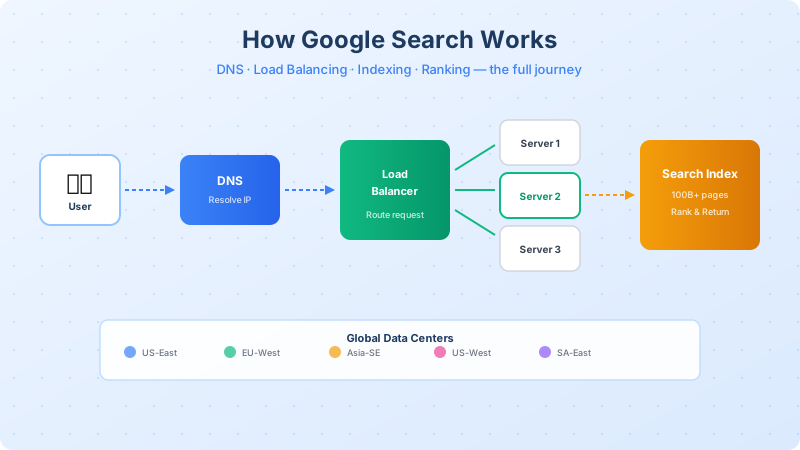
Your request has arrived at Google's IP address. But that IP doesn't point to a single machine — it points to a Google Front End (GFE), a layer of load balancers that sit at the edge of Google's network.
The GFE's job is to pick the best backend server for your request. It considers:
- Server health: Is the server up? Passing health checks?
- Current load: How many requests is it already handling?
- Proximity: Which server is physically closest to you?
- Capacity: Does it have enough resources (CPU, memory)?
Load Balancing Algorithms
Different algorithms trade off between simplicity and intelligence:
- Round Robin: Simplest — just go through the list. Server 1, 2, 3, 1, 2, 3...
- Least Connections: Send to whichever server has the fewest active requests right now.
- Weighted / Adaptive: Factor in server health, load, and capacity scores. This is what Google actually uses — a sophisticated version called Maglev.
Google's Maglev load balancer is a software-defined, distributed system that can handle millions of packets per second per machine. It uses consistent hashing to route requests, which means if one server goes down, only the traffic that serverwas handling gets redistributed — everything else stays put.
Load Balancer Simulator
Watch requests get distributed across servers
US East
US East
EU West
Asia SE
US West
Routes more traffic to healthier, less-loaded servers
Chapter 4: Global Data Centers & Regional Infrastructure
Google operates 40+ data centers across 6 continents, plus over 200 edge points of presence (PoPs). Each data center is a city-sized facility with hundreds of thousands of servers, custom-designed hardware, and its own power and cooling infrastructure.
Why Multiple Regions?
- Latency: Physics dictates that light travels through fiber at about 200,000 km/s. A round trip from New York to Tokyo (~10,800 km) takes at least 108ms just for the speed of light. Having a data center in Tokyo cuts that to near zero.
- Redundancy: If an earthquake takes out a data center in Japan, traffic automatically routes to the next closest region (maybe Singapore or Oregon).
- Data sovereignty: Some countries require data to be processed within their borders. Regional DCs satisfy legal requirements.
- Capacity:8.5 billion Google searches per day can't be served from one location. The load is distributed globally.
How Traffic Gets Routed to the Right DC
Three mechanisms work together:
- GeoDNS: DNS returns different IPs based on your geographic location
- Anycast: The same IP is announced from multiple DCs via BGP; packets naturally flow to the nearest one
- Edge PoPs: Static content (CSS, JS, images) is cached at edge locations even closer to you, so only the dynamic search query hits the main DC
Global Data Center Map
Click a region to see details · Select your location to see routing
Selected Region
US-East
Virginia
50k
Servers
12ms
Latency
● active
Status
How Routing Works
- Anycast IP: Same IP advertised from all DCs via BGP
- GeoDNS: DNS resolver returns nearest DC's IP
- Failover: If a DC goes down, traffic auto-routes to the next closest
- Edge PoPs: 200+ edge locations cache static content globally
Chapter 5: The Search Engine — Crawling, Indexing, Ranking
Your query has reached a Google web server. Now the actual search happens. But Google doesn't search the live internet — that would be impossibly slow. Instead, it searches a pre-built index.
Crawling
Google runs thousands of "Googlebot" crawlers that continuously visit web pages, follow links, and download content. They prioritize popular and frequently-updated sites. The crawler respects robots.txt rules and tries not to overwhelm any single server.
Indexing
Crawled pages are processed and stored in an inverted index— a data structure that maps every word to the list of pages containing it. Think of it like a book's index at the back, but for the entire internet:
"gravity"→ [page_id_1, page_id_2, page_id_3, ...]"how"→ [page_id_1, page_id_4, page_id_5, ...]"works"→ [page_id_1, page_id_6, ...]
The intersection of these lists gives pages that contain all your keywords. This lookup is incredibly fast — milliseconds over billions of pages — because the index is pre-sorted, sharded across thousands of machines, and held in memory.
Ranking
Matching pages are scored using hundreds of ranking signals:
- PageRank: How many quality sites link to this page?
- Content relevance: How well does the page match the query?
- Freshness: Is the content recent?
- BERT / MUM: AI models that understand the meaning of your query, not just keywords
- User signals: Click-through rate, bounce rate, dwell time
- Page experience: Core Web Vitals, mobile-friendliness, HTTPS
The top results are assembled into the Search Engine Results Page (SERP), which includes organic links, featured snippets, knowledge panels, "People also ask" boxes, ads, and more.
Chapter 6: High Availability & Concurrency
Google handles approximately 99,000 searches per second — 8.5 billion per day. How does it stay up under this insane load?
Horizontal Scaling
Google doesn't use one super-powerful server. It uses millions of commodity servers working in parallel. Each search query is actually broken into sub-queries that run across many machines simultaneously, then the results are merged.
Redundancy at Every Layer
- DNS: Multiple authoritative nameservers (ns1–ns4.google.com)
- Load balancers: Active-passive pairs with automatic failover
- Web servers: Thousands of replicas per region
- Index shards: Every index shard has 3+ replicas across different racks and data centers
- Data centers: Full DC failure is a tested and practiced scenario
Circuit Breakers and Graceful Degradation
When a server or DC is overwhelmed, circuit breakers kick in. Instead of crashing, the system:
- Starts returning 503 Service Unavailable for excess requests (shedding load)
- Routes new traffic to healthy servers/regions
- Auto-scales by spinning up new server instances
- Degrades gracefully — maybe the knowledge panel doesn't load, but you still get your ten blue links
Google's SRE Target
Google targets 99.99% availability(the "four nines") for Search. That's less than 52 minutes of downtime per year. They achieve this through chaos engineering, automated rollbacks, canary deployments, and multi-region active-active architecture.
High Concurrency Simulator
See how Google handles 99,000+ queries per second
0
Active
0
Completed
0
Failed
12
Max Concurrent
No requests yet — click a button to start
How Google stays up:Auto-scaling spins up new server instances when load rises. Circuit breakers shed excess traffic (503) to protect healthy servers. Redundant replicas across regions mean even a full DC failure doesn't cause downtime.
Chapter 7: Inspect It Yourself — CLI Commands
You don't have to take my word for it. Here are real commands you can run in your terminal right now to peek behind the curtain. Each one reveals a different layer of Google's infrastructure.
dig google.com— DNS record lookup with query timedig google.com NS— See Google's authoritative nameserversnslookup google.com 8.8.8.8— Resolve via Google's own public DNStraceroute google.com— Trace network hops from you to Googlecurl -I https://www.google.com/search?q=hello— Inspect HTTP response headerscurl -w ...— Measure exact timing breakdown (DNS, TCP, TLS, TTFB)host google.com— Quick DNS + mail server lookupwhois google.com— Domain registration details (since 1997!)
Try These Commands
Real CLI commands you can run in your terminal to inspect Google's infrastructure
; <<>> DiG 9.18.18 <<>> google.com
;; global options: +cmd
;; Got answer:
;; ->>HEADER<<- opcode: QUERY, status: NOERROR, id: 45231
;; flags: qr rd ra; QUERY: 1, ANSWER: 1, AUTHORITY: 0

;; QUESTION SECTION:
;google.com.                    IN      A

;; ANSWER SECTION:
google.com.             300     IN      A       142.250.80.46

;; Query time: 12 msec
;; SERVER: 8.8.8.8#53(8.8.8.8)
;; MSG SIZE  rcvd: 55
Query DNS records for google.com — shows the A record, authoritative nameservers, and query time.
The Complete Picture
Let's stitch it all together. When you search "how does gravity work":
- DNS: Browser resolves google.com → 142.250.80.46 via recursive DNS (GeoDNS picks your nearest DC)
- TCP + TLS: Browser opens an encrypted connection (~50ms for TCP + TLS 1.3)
- HTTP/2 request:
GET /search?q=how+does+gravity+workis sent - GFE load balancer: Routes to the best available web server using weighted health-based routing
- Query processing: Spell-check, synonym expansion, intent classification
- Index lookup: Inverted index returns matching pages from 100B+ documents in milliseconds
- Ranking: PageRank + BERT + 200+ signals score and sort results
- SERP assembly: Organic results, featured snippet, knowledge panel, "People also ask"
- Response: HTML streamed back over HTTP/2. Total time: ~200-400ms.
All of this is replicated across 40+ data centers on 6 continents, with automatic failover, 99.99% uptime, and the capacity to handle 99,000 queries per second — every second of every day.
Next time Google returns results in 0.3 seconds, you'll know exactly what happened in that blink.