Git Branching Visualized
Visualize Git branching with interactive commit graphs — branch, merge, rebase, squash, and compare real-world workflows (Feature Branch, Gitflow, Trunk-Based, Forking).
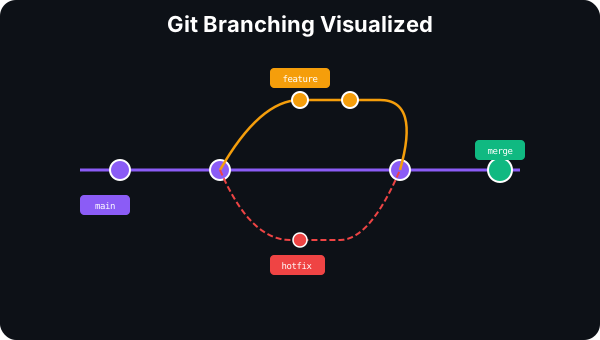
Branches, Checkout & Commits
A branch in Git is just a lightweight pointer to a commit — a 41-byte file containing a SHA hash. Creating a branch is instant (O(1)), no matter how large your repo. Understanding this mental model is key to everything else in Git.
Branch, Checkout, Commit
A branch is just a pointer to a commit. Creating a branch is instant — it doesn't copy any files.
Creates a new branch pointer at the current commit. No commits are created — it's just a label pointing to an existing commit.
$ git branch feature🔑 Key Insight: A branch is just a 41-byte file containing a commit hash. Creating a branch is O(1) — instant, no matter how large your repo. This is why Git branching is so much faster than SVN.
Merge vs Rebase vs Squash
When it's time to integrate branches, you have four options — each producing a different commit graph shape. Fast-forward keeps it linear, 3-way merge preserves history, rebase replays commits, and squash condenses everything into one commit.
Merge vs Rebase vs Squash
Four ways to integrate branches. Each produces a different commit graph shape.
When main has no new commits since the branch was created, Git simply moves the main pointer forward. No merge commit is created — the history stays linear.
$ git checkout main && git merge feature✅ Pros
• Clean linear history
• No merge commit clutter
• Simple to understand
❌ Cons
• Only works if main hasn't diverged
• Loses branch context — can't tell features apart in history
| Property | FF Merge | 3-Way | Rebase | Squash |
|---|---|---|---|---|
| Linear history | ✅ | ❌ | ✅ | ✅ |
| Preserves commits | ✅ | ✅ | ✅ (new hashes) | ❌ |
| Merge commit | ❌ | ✅ | ❌ | ❌ |
| Safe for shared branches | ✅ | ✅ | ❌ NEVER | ✅ |
| Reversibility | Hard | Easy | Hard | Easy |
Branching Workflows & Power Commands
The right branching workflow depends on your team. Feature Branch is simplest, Gitflow adds structure for releases, Trunk-Based is used by Google and Meta, and Forking is standard for open source. Plus the essential power commands every developer should know.
Git Branching Workflows
Different teams use different strategies. The right one depends on your team size, release cadence, and deployment model.
The most common workflow. Each feature gets its own branch off main. Merged via PR when ready. Simple, clean, works for most teams.
git checkout -b feature/login mainCreate feature branch from main
git add . && git commit -m "Add login"Work and commit on feature branch
git push origin feature/loginPush to remote, open PR
git checkout main && git merge feature/loginMerge after review
git branch -d feature/loginDelete feature branch
Best for: Small teams, simple projects, most common starting workflow.
Power Commands
Essential commands every developer should know beyond basic branching.
git cherry-pick <hash>Apply a specific commit to the current branch. Useful for backporting hotfixes.
git stashTemporarily save uncommitted changes. Use git stash pop to restore them.
git reflogShow history of HEAD movements. Your safety net — recover "lost" commits.
git reset --soft HEAD~1Undo last commit but keep changes staged. Great for amending mistakes.
git rebase -i HEAD~3Interactive rebase: squash, reorder, edit, or drop the last 3 commits.
git bisect startBinary search through commits to find which one introduced a bug.
⚠️ Golden Rule: Never rebase or force-push branches that other people are working on. Rewriting shared history causes divergence that's painful to resolve. Only rebase your own local branches before merging.