Gaussian Naive Bayes Explained — A Visual Guide
A complete visual walkthrough of Gaussian Naive Bayes — from bell curve assumptions to real predictions. Interactive Gaussian PDF curves, step-by-step training, live classification, and evaluation with a student exam dataset.
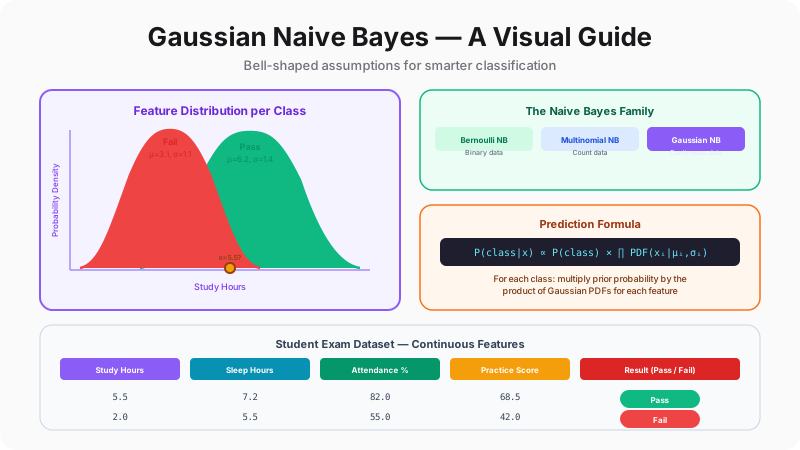
What Is Gaussian Naive Bayes — And Why Should You Care?
Imagine you're a teacher who has seen hundreds of students over the years. After a while, you develop an intuition: students who study more than 5 hours a day, sleep well, attend class regularly, and practice consistently tend to pass. Students who don't, tend to fail. You can't explain the exact math, but you feel the pattern. Gaussian Naive Bayes is essentially this intuition, turned into a precise mathematical formula.
The algorithm belongs to the Naive Bayes family— a group of classifiers built on Bayes' Theorem with a “naive” simplifying assumption: that features are independent of each other. The “Gaussian” part means it assumes each feature follows a normal (bell curve) distribution. Study hours among passing students form a bell curve centered around ~6 hours. Sleep hours among failing students form a different bell curve centered around ~5 hours. The algorithm learns these bell curves from training data, then uses them to classify new students.
Why is this useful? Because Gaussian NB is absurdly fast to train (it just calculates means and standard deviations), works surprisingly well even with small datasets, requires essentially zero hyperparameter tuning, and gives you probability estimates — not just labels. It's the algorithm data scientists reach for first as a baseline, and it's often good enough to be the final model. Let's understand it visually, step by step, using a student exam dataset.
The Naive Bayes Family
Three variants, one core idea — they differ in what kind of data they assume each feature contains.
Data Type
Continuous (real-valued)
Key Assumption
Each feature follows a normal (bell curve) distribution
Typical Example
Exam prediction: study hours, sleep duration, attendance rate
The “naive” part: All three variants make the same simplifying assumption — that features are conditionally independent given the class. In plain English: knowing a student's study hours tells you nothing about their sleep hours, once you already know whether they passed. This is almost never true in real life, but it works surprisingly well anyway.
Our Dataset: Student Exam Performance
20 students, 4 continuous features, 1 binary target. Can we predict who passes?
| ID | Study Hrs | Sleep Hrs | Attendance % | Practice Score | Result |
|---|---|---|---|---|---|
| 1 | 6.2 | 7.5 | 88 | 72 | Pass |
| 2 | 2.1 | 5.0 | 45 | 35 | Fail |
| 3 | 7.8 | 8.0 | 92 | 81 | Pass |
| 4 | 1.5 | 4.5 | 38 | 28 | Fail |
| 5 | 5.0 | 6.8 | 75 | 65 | Pass |
| 6 | 3.2 | 5.5 | 52 | 40 | Fail |
| 7 | 8.5 | 7.0 | 95 | 88 | Pass |
| 8 | 1.8 | 4.0 | 42 | 30 | Fail |
| 9 | 4.5 | 7.2 | 70 | 58 | Pass |
| 10 | 2.8 | 5.2 | 50 | 38 | Fail |
| 11 | 7.0 | 8.2 | 90 | 78 | Pass |
| 12 | 3.5 | 6.0 | 55 | 45 | Fail |
| 13 | 5.8 | 7.8 | 82 | 70 | Pass |
| 14 | 2.5 | 4.8 | 48 | 32 | Fail |
Features: Study Hours (daily average), Sleep Hours (night before exam), Attendance % (class attendance rate), Practice Score (mock exam score out of 100). Target: Pass or Fail.
The Gaussian (Normal) Distribution — Interactive
Drag the sliders to see how mean (μ) and standard deviation (σ) shape the bell curve.
The center of the bell — where most data points cluster
How spread out the data is — wider σ = flatter curve
Key insight: Gaussian NB assumes each feature's values form a bell curve like this — separately for each class. For “Pass” students, study hours might center around μ=6.2 with σ=1.4. For “Fail” students, the same feature centers around μ=2.5 with σ=0.8. The algorithm learns these μ and σ values from the training data, then uses them to calculate how likely a new student belongs to each class.
Now that we understand the family, our dataset, and the bell curve foundation, let's train the model. Training Gaussian NB is refreshingly simple — no gradient descent, no loss functions, no epochs. Just two statistics per feature per class: a mean and a standard deviation.
Training — Learning Bell Curves from Data
Training a neural network means iterating through data thousands of times, adjusting millions of weights via backpropagation. Training Gaussian NB means making one pass through the dataand computing two numbers per feature per class. That's it. The entire “training” process for our 4-feature, 2-class problem produces exactly 16 numbers: 4 means and 4 standard deviations for “Pass,” plus 4 means and 4 standard deviations for “Fail.”
The training happens in two steps. First, we calculate the class prior probabilities— how often each class appears in the training data. If 7 out of 14 training students passed, the prior probability of passing is 0.5. Second, for each feature within each class, we compute the mean (μ) and standard deviation (σ). These two numbers fully define a Gaussian bell curve — the mean tells us where the curve is centered, and the standard deviation tells us how wide it is.
Once we have these bell curves, we can evaluate any new data point by asking: “How likely is this value under the Pass distribution? How likely is it under the Fail distribution?” This likelihood is calculated using the Gaussian Probability Density Function (PDF)— the mathematical formula that gives the height of the bell curve at any point. Let's walk through each step.
Step 1 — Calculate Class Probabilities
How often does each class appear in the training data? This becomes our “prior” belief before looking at any features.
7/14
P(Pass) = 0.500
7 students passed out of 14
7/14
P(Fail) = 0.500
7 students failed out of 14
What this means: Before we know anything about a new student, our best guess is a coin flip — 50% chance of passing. The features will shift this probability up or down. These prior probabilities get multiplied into the final score.
Step 2 — Learn μ and σ for Each Feature per Class
For each feature, calculate the mean and standard deviation separately for Pass and Fail students. This defines two bell curves.
Pass students — Study Hours
Mean (μ)
6.40
Std (σ)
1.35
Fail students — Study Hours
Mean (μ)
2.49
Std (σ)
0.68
That's the entire training! We now have 2 numbers (μ and σ) per feature per class = 16 numbers total (4 features × 2 classes × 2 stats). These 16 numbers fully define our trained model. No weights, no gradient descent, no epochs — just means and standard deviations. This is why Naive Bayes is so fast to train.
The Gaussian PDF — How Likely Is This Value?
Given a trained bell curve (μ and σ), the PDF tells us how “likely” any specific value is under that distribution.
Gaussian Probability Density Function:
PDF(x) = 1/(σ√(2π)) × exp(-(x - μ)² / (2σ²))
Feature
Study Hours (Pass class)
μ = 6.26, σ = 1.38
PDF output
0.2484
High density — typical value
Important: The PDF output is not a probability (it can exceed 1.0). It's a density — a relative measure of how typical this value is under the distribution. Higher density = more likely to belong to that class. We compare densities across classes to make predictions.
The model is trained — 16 numbers stored in memory. Now comes the exciting part: using these bell curves to classify a completely new student. The prediction process is elegant: for each class, multiply the prior probability by the PDF values for each feature, then pick the class with the highest score. Let's watch it happen.
Making Predictions — From Bell Curves to Classification
A new student walks in: they study 5.5 hours a day, slept 7.2 hours last night, have 72% attendance, and scored 60 on the practice exam. Will they pass? Here's exactly how Gaussian NB answers this question — and it takes less than a microsecond.
For each class (Pass and Fail), the algorithm does the same thing: start with the class prior probability, then for each of the 4 features, look up the trained bell curve (μ and σ) and calculate the PDF — the height of that bell curve at the student's value. A study hours value of 5.5 might have a PDF of 0.28 under the Pass curve but only 0.04 under the Fail curve. That's strong evidence for Pass on that one feature alone.
The “naive” assumption — that features are independent — is what makes the final calculation simple: just multiply everything together. The class with the higher product wins. The formula is: P(class) × PDF₁ × PDF₂ × PDF₃ × PDF₄. No matrix multiplication, no activation functions, no forward pass — just basic arithmetic. Watch the step-by-step walkthrough below, then try the live classifier yourself.
Classifying a New Student — Step by Step
Watch the algorithm walk through each feature, calculate PDFs, and make a prediction.
New student to classify
Study Hrs
5.5
Sleep Hrs
7.2
Attendance %
72
Practice Score
60
Try It Yourself — Live Classifier
Adjust the sliders and watch the prediction change in real time.
| Feature | Pass PDF | Fail PDF | Favors |
|---|---|---|---|
| Study Hrs = 5 | 0.1726 | 0.0006 | Pass |
| Sleep Hrs = 6.5 | 0.0995 | 0.0310 | Pass |
| Attendance % = 70 | 0.0110 | 0.0000 | Pass |
| Practice Score = 55 | 0.0065 | 0.0001 | Pass |
| Prior × Product | 6.144e-7 | 1.594e-14 | Pass |
Predicted: Pass
The classifier works — but how welldoes it work? And what happens when our assumptions don't hold — when features aren't really Gaussian, or when they're not really independent? Let's evaluate the model on held-out test data, explore when the Gaussian assumption breaks, and learn the practical tips that make Gaussian NB work in production.
Evaluation, Tuning, and Real-World Advice
A model is only as good as its performance on data it hasn't seen. We held back 6 students from training — now let's see if our 16-number model can correctly classify them. We'll also look at the confusion matrix (not just accuracy), because in many applications, a false negative (missing a student who will fail) is far worse than a false positive.
Beyond raw evaluation, there are practical techniques that experienced practitioners use to get more out of Gaussian NB. The most important is the power transformation— a preprocessing step that makes skewed features more bell-curve-shaped, better matching the algorithm's assumptions. When features like income, click counts, or time-to-event are heavily skewed, a Box-Cox transform can meaningfully improve accuracy.
Finally, knowing when to use Gaussian NB is as important as knowing how. It's not the best algorithm for every problem — but for the right problems, it's unbeatable in its simplicity-to-performance ratio. Let's evaluate, tune, and understand the full picture.
Model Evaluation on Test Set
How did our trained model do on the 6 students it has never seen before?
| ID | Study | Sleep | Attend. | Practice | Actual | Predicted | Correct? |
|---|---|---|---|---|---|---|---|
| 15 | 6.5 | 7 | 85 | 75 | Pass | Pass | ✅ |
| 16 | 4 | 6.5 | 65 | 55 | Pass | Pass | ✅ |
| 17 | 1.2 | 4.2 | 35 | 25 | Fail | Fail | ✅ |
| 18 | 9 | 7.5 | 98 | 92 | Pass | Pass | ✅ |
| 19 | 3.8 | 5.8 | 58 | 48 | Fail | Fail | ✅ |
| 20 | 5.5 | 7.2 | 78 | 62 | Pass | Pass | ✅ |
100%
Accuracy
6 out of 6 correct
Confusion Matrix
When Features Aren't Gaussian — Power Transformation
Real data rarely follows a perfect bell curve. Power transforms (like Box-Cox) can make skewed data more Gaussian-like.
# Apply PowerTransformer before training
from sklearn.preprocessing import PowerTransformer

pt = PowerTransformer(standardize=True)  # Includes standard scaling
X_train_transformed = pt.fit_transform(X_train)
X_test_transformed = pt.transform(X_test)

# Then train GaussianNB on transformed data
gnb = GaussianNB()
gnb.fit(X_train_transformed, y_train)
When to use: If your features are clearly skewed (e.g., income data, click counts, time-to-event), apply a power transform before training. If features already look roughly bell-shaped, the transform adds negligible benefit. Always compare accuracy with and without transformation.
Strengths, Weaknesses, and When to Reach for Gaussian NB
Blazing fast training
Just computes means and standard deviations — O(n×d) time. Trains on millions of rows in seconds.
Works with very little data
Since it only estimates 2 parameters per feature per class, it performs well even with small datasets where complex models overfit.
No hyperparameter tuning
Essentially no knobs to turn. The default var_smoothing (1e-9) works in nearly all cases. Contrast this with neural networks or SVMs.
Naturally handles multi-class
Extends to 3, 10, or 100 classes with zero modification — just compute μ and σ per class per feature.
Probabilistic output
Gives actual probability estimates (not just labels), useful for ranking, thresholding, and downstream decision-making.
Excellent baseline
Often the first model to try. If Gaussian NB gets 85% accuracy, you know a more complex model should get at least that.
Complete scikit-learn Implementation
Everything from this tutorial in runnable Python — copy, paste, and experiment.
import pandas as pd
import numpy as np
from sklearn.naive_bayes import GaussianNB
from sklearn.preprocessing import PowerTransformer
from sklearn.metrics import accuracy_score, classification_report
from sklearn.model_selection import train_test_split

# Our student exam dataset
data = {
    'StudyHours':    [6.2, 2.1, 7.8, 1.5, 5.0, 3.2, 8.5, 1.8, 4.5, 2.8,
                      7.0, 3.5, 5.8, 2.5, 6.5, 4.0, 1.2, 9.0, 3.8, 5.5],
    'SleepHours':    [7.5, 5.0, 8.0, 4.5, 6.8, 5.5, 7.0, 4.0, 7.2, 5.2,
                      8.2, 6.0, 7.8, 4.8, 7.0, 6.5, 4.2, 7.5, 5.8, 7.2],
    'Attendance':    [88, 45, 92, 38, 75, 52, 95, 42, 70, 50,
                      90, 55, 82, 48, 85, 65, 35, 98, 58, 78],
    'PracticeScore': [72, 35, 81, 28, 65, 40, 88, 30, 58, 38,
                      78, 45, 70, 32, 75, 55, 25, 92, 48, 62],
    'Result':        ['Pass','Fail','Pass','Fail','Pass','Fail','Pass','Fail',
                      'Pass','Fail','Pass','Fail','Pass','Fail','Pass','Pass',
                      'Fail','Pass','Fail','Pass']
}

df = pd.DataFrame(data)
X, y = df.drop('Result', axis=1), (df['Result'] == 'Pass').astype(int)

# Split 70/30
X_train, X_test, y_train, y_test = train_test_split(
    X, y, test_size=0.3, random_state=42
)

# Optional: Power transform for more Gaussian-like features
pt = PowerTransformer(standardize=True)
X_train_t = pt.fit_transform(X_train)
X_test_t = pt.transform(X_test)

# Train Gaussian Naive Bayes
gnb = GaussianNB()
gnb.fit(X_train_t, y_train)

# Predict and evaluate
y_pred = gnb.predict(X_test_t)
print(f"Accuracy: {accuracy_score(y_test, y_pred):.2%}")
print(classification_report(y_test, y_pred, target_names=['Fail','Pass']))
Key Parameters
priors — Class probabilities. Default: calculated from data. Rarely needs changing.
var_smoothing — Stability value added to variances (default: 1e-9). Prevents division by zero.
Key Takeaway
Gaussian NB is designed to work out of the box. Two lines of code (fit() and predict()) are all you need. No tuning, no feature engineering, no GPU. It's the fastest path from data to predictions.
The Complete Picture
Gaussian Naive Bayes is one of those rare algorithms that you can fully understand in a single sitting — and that understanding translates directly into practical skill. The entire algorithm is: (1) compute means and standard deviations from training data, (2) for new data, evaluate Gaussian PDFs and multiply. That's it. No hidden complexity, no architectural choices, no training loops.
This simplicity is its superpower. When you need a fast baseline, when data is scarce, when you need interpretable predictions, when you need real-time classification on resource-constrained devices — Gaussian NB delivers. It won't win Kaggle competitions against gradient-boosted ensembles, but it will give you a working classifier in minutes while others are still tuning hyperparameters. And in production, “working and simple” beats “optimal and complex” more often than you'd think.