DOM Manipulation Illustrated
Visualize the DOM tree, run live operations (textContent, classList, appendChild, remove), and master event bubbling and delegation with interactive demos.
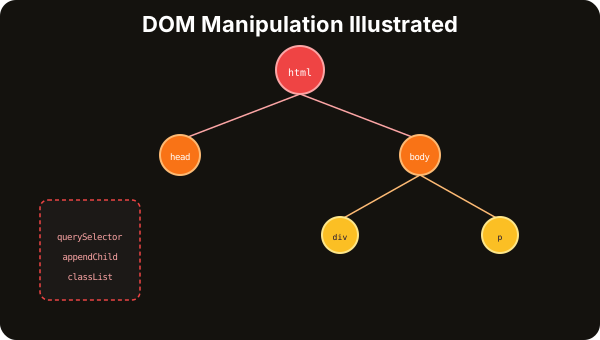
The DOM Tree & Selectors
The Document Object Model is a tree of nodes representing your HTML. Every element, attribute, and piece of text is a node. JavaScript uses CSS selectors to find nodes, then reads or modifies them.
The DOM Tree & Selectors
The DOM is a tree of nodes representing your HTML. JavaScript uses CSS selectors to find and manipulate these nodes.
Quick Reference
// Finding elements
document.querySelector(".class")     // First match
document.querySelectorAll(".class")  // All matches (NodeList)
document.getElementById("id")       // By ID (fastest)
element.closest(".parent")          // Walk UP the tree
Live DOM Operations
Once you've selected an element, you can change its text, classes, attributes, styles — or create and remove elements entirely. Each operation updates the live DOM tree immediately.
Live DOM Operations
Click any operation to apply it. Watch the live preview and DOM tree update in real time.
Live Preview
Hello World
This is a paragraph.
Current DOM State
Events & Delegation
DOM events are how JavaScript responds to user interactions. Understanding event bubbling and delegation is crucial — one listener on a parent element can handle events for all its children, including dynamically added ones.
DOM Events
Events are how JavaScript responds to user interactions. Every event follows the capture → target → bubble path.
Fires when element is clicked. The most common event. Bubbles up from target to document.
element.addEventListener("click", (e) => {
  console.log("Clicked:", e.target);
});
Event Bubbling
When an event fires, it "bubbles" up from the target element through every ancestor to the document. This is how event delegation works.
Event Delegation
Instead of adding a listener to every child, add ONE listener to the parent. Bubbling ensures it catches all child events — even for dynamically added elements.
Click any item (handled by parent)
Parent: ul#list — listener here
Event Log
Click an item to see delegation in action...
// ONE listener on parent handles ALL children
list.addEventListener("click", (e) => {
  const item = e.target.closest("li");
  if (item) handleClick(item.textContent);
});
// ✅ Works for dynamically added items too!
🔑 Why Delegation? (1) One listener instead of N — better performance. (2) Works for dynamically added elements. (3) Less memory usage. (4) Simpler cleanup — remove one listener instead of many.