The CSS Box Model
Master the CSS Box Model — interactive content/padding/border/margin visualizer, box-sizing explained, margin collapsing scenarios & fixes, and display types (block, inline, inline-block) with live demos.
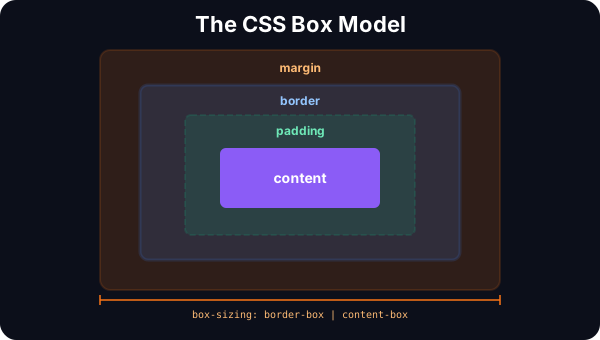
The CSS Box Model — Visual Breakdown
Every element in CSS is a rectangular box composed of four layers: content (your text/images), padding (space inside the border), border (the visible edge), and margin (space outside the border). The box-sizing property determines whether padding and border are included in or added to your declared width.
Interactive Box Model
Adjust every layer and see exactly how the box dimensions are calculated.
Content
Padding
20px (all sides)Border
3px (all sides)Margin
16px (all sides)Content
200×100
Size Calculation (content-box)
Total width = content (200) + padding-L (20) + padding-R (20) + border-L (3) + border-R (3) = 246px
Total height = content (100) + padding-T (20) + padding-B (20) + border-T (3) + border-B (3) = 146px
+ margin (16px all sides) for outer spacing
.element {
  box-sizing: content-box;
  width: 200px;
  height: 100px;
  padding: 20px;
  border: 3px solid #F59E0B;
  margin: 16px;
}
/* Rendered total: 246px × 146px (width ≠ what you set!) */
🔑 Key Takeaway: With content-box (default), padding and border are added to your width — the element is bigger than you expect. With border-box, width includes padding and border — what you set is what you get. Always use *, *::before, *::after { box-sizing: border-box }.
Margin Collapsing
One of CSS's most confusing behaviors: when vertical margins of adjacent elements touch, they collapse into a single margin (the larger of the two). This happens between siblings, parent-child, and even empty elements. Understanding when and why is essential.
Margin Collapsing — The Tricky Part
Vertical margins between elements don't stack — they collapse into the larger one. This catches every CSS developer off guard.
When two vertical margins meet between sibling elements, they collapse into the larger one.
Expected gap: 50px (30 + 20) → Actual gap: 30px (collapsed to the larger margin)
How to Prevent Margin Collapse
padding-top: 1px;Even 1px prevents collapse
border-top: 1px solid transparent;Invisible border blocks collapse
overflow: auto;Creates a new block formatting context
display: flow-root;Modern BFC — best solution for parent-child
display: flex; flex-direction: column;Flex/Grid items never collapse margins
gap: 1rem;Gap replaces margins entirely. No collapsing.
/* Best practice: use flow-root for parent-child */
.parent {
  display: flow-root; /* Creates BFC, prevents collapse */
}

/* Or just use gap (no margins needed) */
.stack {
  display: flex;
  flex-direction: column;
  gap: 1rem; /* Never collapses */
}
🔑 Key Takeaway: Vertical margins collapse — only the larger one applies. This only happens in normal flow (not Flexbox, Grid, or floats). The modern fix: use display: flow-root on parents or replace margins with gap in Flex/Grid layouts.
Display Types & Box Behavior
The display property determines which box model rules apply. Block elements take full width and respect all properties. Inline elements flow with text but ignore width/height. Inline-block gives you the best of both worlds.
Display Types & the Box Model
The display property determines how the box model applies to an element.
Takes full width. Starts on a new line. Width, height, margin, padding all work.
Default elements: div, p, h1-h6, section, article, header, footer, form| Property | block | inline | inline-block |
|---|---|---|---|
| width / height | ✅ Works | ❌ Ignored | ✅ Works |
| margin (horiz) | ✅ Works | ✅ Works | ✅ Works |
| margin (vert) | ✅ Works | ❌ Ignored | ✅ Works |
| padding | ✅ Works | ⚠️ Visual only | ✅ Works |
| Line break | ✅ Yes | ❌ No | ❌ No |
| Full width | ✅ Default | ❌ Content | ❌ Content |
🔑 Key Takeaway: block elements take full width and respect all box model properties. inline elements flow with text but ignore width/height and vertical margins. inline-block gives you inline flow with full box model support — the best of both.